MCP skills: serve Agent Skills from your MCP server
Serve Agent Skills from your MCP server, so Claude, Claude Code and VS Code load your skills with your tools and people install nothing extra.
On this page
- 01What are MCP skills?
- 02Skills vs MCP: do you need both?
- 03How does Claude use a skill from an MCP server?
- 04Which AI apps load skills from MCP servers?
- 05How to serve skills from your MCP server
- 06How to write a skill that AI apps follow
- 07What to check before you ship
- 08How Transica helps
- 09Common questions
- 10Sources
To serve skills from your MCP server, write each skill as a SKILL.md file and declare the MCP Skills Extension, io.modelcontextprotocol/skills. Then answer skills/list and skills/get, and serve each file as a resource at skill://<name>/SKILL.md.
As of November 2026, Claude and Claude Code load skills from MCP servers in a public beta that Anthropic opened on 24 November. VS Code loads them from version 1.147, while ChatGPT, Codex, Gemini CLI and Cursor don't.
Transica builds your MCP server from your website URL or OpenAPI spec, or connects to yours. It adds OAuth sign-in and per-tool control, hosting with health checks, real-agent tests, MCP and directory updates, and ChatGPT, Claude and Gemini submissions (everything Transica does).
What are MCP skills?
A skill is a short set of written instructions for one task. It lives in a file called SKILL.md, in the Agent Skills format, and has three parts:
- A name, such as
check-warranty-status. - A description: the when-to-use line, which says what the skill does and when to use it.
- Steps, written in Markdown below.
Skills over MCP means your MCP server sends its skills along with its tools. People who connect the server get the skills too, with nothing else to install. The skill lives on the server, so a change you make there reaches everyone who uses it.
The MCP Skills Extension, SEP-2640, defines how this works. It's a Final proposal on MCP's Extensions Track. If MCP servers are new to you, start with what an MCP server is.
Skills vs MCP: do you need both?
They do different jobs:
- MCP tools give access. They read your data and take actions in your product.
- A skill gives the how. It tells the AI which tools to call, in what order, and what rules to follow.
Use MCP tools when the AI needs live data or actions. Add skills for the tasks people repeat, where the order of calls and the rules matter.
The two used to ship separately: people installed a skill in one place and connected the MCP server in another. Now one server can carry both.
Do skills replace MCP? No. A skill holds only instructions. Its steps still call MCP tools to read or change anything in your product.
How does Claude use a skill from an MCP server?
- When the server connects, Claude asks it for its skills with
skills/list. - It keeps only each skill's name and when-to-use line in context. That's about 100 tokens a skill.
- When a request matches a when-to-use line, it loads that one skill's
SKILL.md. - It follows the steps and calls the tools they name.
In Claude Code, each served skill also appears as a command named /<server>:<skill>.
Here is check-warranty-status, one of four skills that WarrantyWarden, a warranty-tracking app, serves from https://mcp.warrantywarden.com/mcp:
---
name: check-warranty-status
description: "Use when the person asks whether one of their products is still under warranty or when that warranty ends."
---

1. Call search_inventory with the product name, brand or model the person gave. If it returns several matches, read them back and ask which one they mean. If it returns nothing, say the product is not in their inventory and stop.
2. Call get_item_warranty with the `id` of the matched item as item_id.
3. Tell the person the warranty status, the warranty end date and the days remaining. If the tool shows no warranty for that item, say so plainly instead of guessing.
4. If it ends within 60 days, call get_upcoming_alerts and say which reminders are set.

Never state a warranty status for a product without calling get_item_warranty for that exact item_id. Take item_id only from a tool result such as search_inventory or list_user_items; never make one up.
A question such as "Is my dishwasher still under warranty?" matches the when-to-use line. The AI would load this file, then call search_inventory and get_item_warranty.
Which AI apps load skills from MCP servers?
As of 27 November 2026:
| App | Loads skills from an MCP server? | Notes |
|---|---|---|
| Claude | Yes, public beta since 24 November 2026 | On by default on Pro, Max and Ultra. Team once an admin turns it on. Enterprise coming soon |
| Claude Code | Yes, public beta, version 2.1.331 or later | Skills appear as /<server>:<skill>. Not in cloud sessions, claude -p, Remote Control server mode, GitHub Actions or the Agent SDK |
| VS Code (GitHub Copilot) | Yes, from version 1.147 (18 November 2026) | On by default, with the setting chat.agentHost.mcpSkills.enabled. Asks to allow skills on first connection |
| ChatGPT and Codex | No | Skills go inside the plugin package. The extension's implementations list shows both as planned |
| Gemini CLI | No | Skills come only from folders and extensions |
| Cursor | No | Its MCP docs don't list skills |
ChatGPT takes skills a different way. They ship inside the plugin you submit to its directory, each skill a folder with a SKILL.md. To reach ChatGPT too, put the same skill folders in your plugin package (how to make a ChatGPT plugin).
How to serve skills from your MCP server
- Write one
SKILL.mdper skill, in a folder named after the skill. Thenamemust match the folder: lowercase letters, digits and hyphens, up to 64 characters. Thedescriptioncan be up to 1,024 characters. - Declare the extension and resources. Add
io.modelcontextprotocol/skillsto your server's extensions, and declare theresourcescapability as well. - Answer
skills/listandskills/get. Each entry has the skill'suri, its frontmatter exactly as written, and every file with itssha256digest and size. - Serve each file as a resource. The address is
skill://<name>/SKILL.md, and apps read it withresources/read. - Use protocol revision 2026-07-28 or later. Claude Code requires it.
With the official TypeScript SDK (v2.4.0), loadSkills reads a folder of skills, and attach does steps 2 to 4:
import { McpServer } from "@modelcontextprotocol/server";
import { loadSkills } from "@modelcontextprotocol/server/ext/skills/node";

const server = new McpServer({ name: "warrantywarden", version: "1.0.0" });
// Register your tools as usual.

// ./skills/check-warranty-status/SKILL.md, ./skills/review-expiring-warranties/SKILL.md, …
const skills = await loadSkills("./skills");
skills.attach(server); // before you connect a transport
For Python, FastMCP has its own skills over MCP support.
WarrantyWarden's skills/list entry for check-warranty-status looks like this:
{
  "uri": "skill://check-warranty-status/SKILL.md",
  "frontmatter": {
    "name": "check-warranty-status",
    "description": "Use when the person asks whether one of their products is still under warranty or when that warranty ends."
  },
  "resources": [
    {
      "uri": "skill://check-warranty-status/SKILL.md",
      "digest": "sha256:4fcac5b3d874dadb7af86130bdba2ab7912e8a7e5a570f8cf574828730af228a",
      "size": 920
    }
  ]
}How to write a skill that AI apps follow
- Write the when-to-use line around the person's request. It's the only part always in context, so it decides whether the skill loads. Start from what people ask: "Use when the person asks whether one of their products is still under warranty."
- Name a tool in each step. For example: "Call get_item_warranty with the
idof the matched item as item_id." - Say what to do when a tool finds nothing. WarrantyWarden's first step ends: "If it returns nothing, say the product is not in their inventory and stop."
- Add rules for what must never happen. WarrantyWarden's skills end with lines such as "Take item_id only from a tool result such as search_inventory or list_user_items; never make one up."
- Keep it short. The Agent Skills spec recommends a
SKILL.mdunder 500 lines and about 5,000 tokens. Each of WarrantyWarden's four skills is under 1 KB. - Keep one task per skill. Checking a warranty and reviewing a subscription plan are two skills, each with its own when-to-use line.
- Stick to text unless you need files. A skill can carry scripts and other files, but apps ask people to approve scripts skill by skill. Claude Code doesn't load archives or other binary files.
What to check before you ship
- Limits. Claude Code loads up to 100 skills per server, with at most 100 KB per text file and 400 KB per skill. The spec caps a skill at 512 files and 16 MiB.
- Approval after changes. Apps tie approval to each file's address and digest. When a file changes, they ask again. In Claude Code's manual mode, that's an Allow this version prompt.
- Scans for directory connectors. Anthropic scans the skills of third-party connectors in Claude's Connectors Directory before a version loads. During the beta, it keeps skills off for some connectors.
- No hidden instructions. Apps treat skill text as untrusted and show which server it came from. Write only what a person reading the file would expect to find.
- Listed files, not dynamic ones. An entry can mark its files
"dynamic"instead of listing digests, but apps may refuse those skills. - Tool names that still exist. A skill that names a renamed or removed tool sends the AI to a tool that isn't there. Update your skills whenever your tools change (the MCP server lifecycle).
- A test in Claude Code. Add your server to Claude Code (how), start an interactive session and type
/<server>:<skill>. Typing the command needs no approval.claude -pdoesn't load served skills.
How Transica helps
When Transica hosts your MCP server, the connector serves skills on its own, through the same extension. Claude Code 2.1.332 loads and runs them.
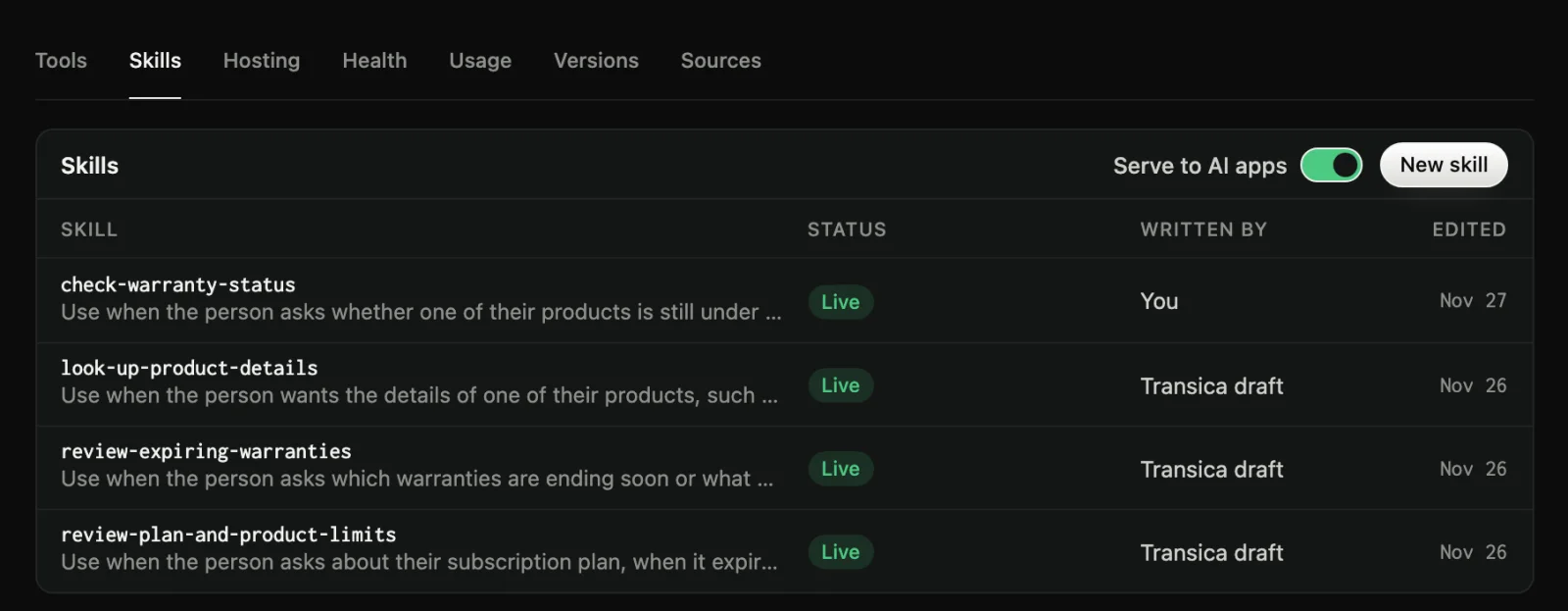
- First drafts. After the first publish, or when hosting is turned on, Transica's AI writes the first skills as task steps from your tools. Each one is marked Transica draft.
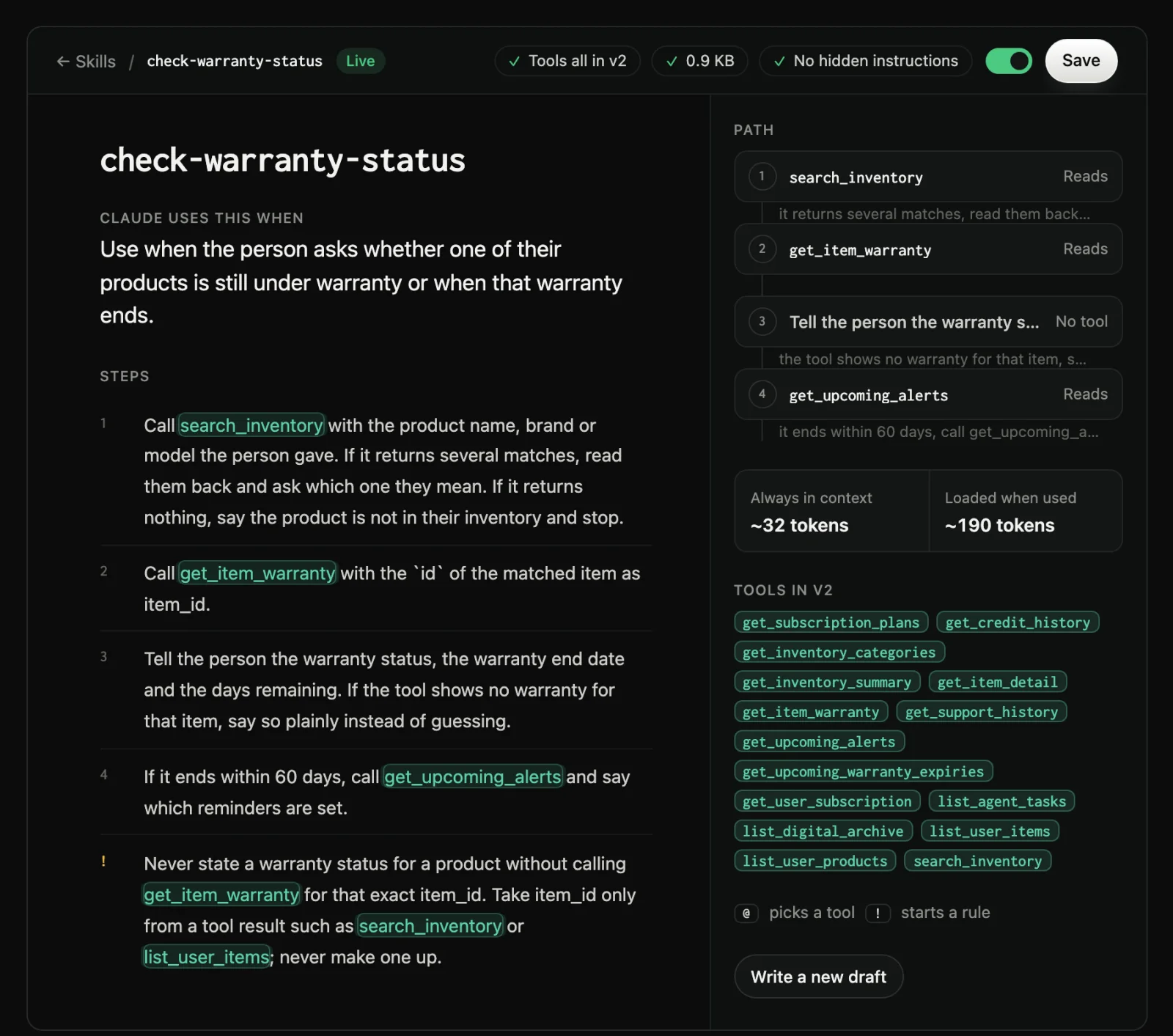
- An editor. You edit each skill on the connector's Skills tab: its name, the Claude uses this when line and the steps. Typing "@" picks a tool, and "!" starts a rule. The right panel draws the path the AI follows and the context cost: Always in context and Loaded when used.
- Live on save. Each save goes live at once.
- Checks. A skill that names a removed tool is flagged Names a removed tool. A save with hidden instructions is refused.
- One switch. Serve to AI apps turns skills off for the whole connector.
- Health checks. Hosting health checks re-send a served copy that differs from yours.
- Limits. Up to 20 skills per connector, text only.
MCP servers you host yourself and connect to Transica have no Skills tab yet.
- Free directory check. Paste your server's address into the MCP directory check, no account, to see what ChatGPT's and Claude's directories would flag.
- Done for you. With MCP server development, from $1,500, Transica builds the app, records the demo, prepares both submissions and stays with you through review.
- Also. Transica can build your app from your website's address or OpenAPI spec, or connect to an MCP server you already have. It runs health checks every 15 minutes, keeps your app in line with MCP and directory rule changes, and prepares Gemini submissions too. Real AI agents test your app in a browser.
Common questions
Can an MCP server have skills?
Yes. With the MCP Skills Extension (SEP-2640), a server lists its skills with skills/list and serves each SKILL.md as a resource. Claude, Claude Code and VS Code load them.
Are skills part of the MCP protocol?
Yes, as an official extension rather than part of the core spec. SEP-2640 is Final on MCP's Extensions Track, with the id io.modelcontextprotocol/skills.
Should I use MCP or skills?
Both, for different jobs. Use MCP tools when the AI needs live data or actions, and add skills for tasks with set steps. One MCP server can serve both.
Do skills replace MCP?
No. A skill holds only instructions. It still needs MCP tools to read or change anything in your product.
Does ChatGPT load skills from MCP servers?
No, as of November 2026. ChatGPT takes skills inside the plugin package you submit. The extension's implementations list shows ChatGPT and Codex as planned.
What happens when I change a skill?
The file gets a new digest, so apps ask people to approve it again. Anthropic also scans a new version of a Directory connector's skills before it loads. On Transica, a save goes live at once.
How many skills can one server serve?
Claude Code loads up to 100 skills per server. The spec caps each skill at 512 files and 16 MiB. A Transica-hosted connector serves up to 20.
Can Transica write skills for my MCP server?
Yes, for MCP servers Transica builds and hosts. Its AI drafts the first skills from your tools, and you edit them on the connector's Skills tab.
Can Transica host my MCP server and serve its skills?
Yes, for connectors it builds and hosts. The skills are served with the tools, and Serve to AI apps switches them off.
Can Transica work with my existing MCP server?
Yes. Connect it to Transica. It fetches the server's tools, tests them, watches them for changes and prepares its directory listings. You keep hosting it, or the done-for-you service can host it for you.
Sources
All read on 27 November 2026.
- Model Context Protocol: SEP-2640: Skills Extension, Skills extension overview, ext-skills implementations
- Agent Skills: Specification
- Anthropic: MCP servers can now ship skills, run tasks, and more with Claude, Claude Code: connect to tools through MCP
- Microsoft: Visual Studio Code 1.147
- OpenAI: Skills