MCP server build and hosting service: what Transica does
Transica builds a custom MCP server from your website or OpenAPI spec, hosts it with your login and lists it in ChatGPT, Claude and Gemini. Prices and limits.
On this page
- 01What does Transica do?
- 02Can Transica build an MCP server if I only have a website and no developer?
- 03Can it build an MCP server from an OpenAPI spec?
- 04Can Transica host an MCP server I already have?
- 05How do customers sign in, and do they only see their own data?
- 06Can I choose what each tool is allowed to do?
- 07How does Transica test the server?
- 08Does Transica handle the ChatGPT, Claude and Gemini submissions?
- 09What happens after the app goes live?
- 10How much does Transica cost?
- 11Can Transica do all of it for me?
- 12What doesn't Transica do?
- 13How does Transica compare with other MCP services?
- 14Common questions
- 15Sources
Transica is a service that builds an MCP server for your business, hosts it and takes it through the ChatGPT, Claude and Gemini directory submissions.
It builds the server from your website URL or your OpenAPI spec, and your customers sign in with the login they already have.
Building and testing are free, hosting starts at $19 a month, and Transica can do all of it for you from $1,500.
What does Transica do?
It covers the whole path from your website to a listed app:
- Build. From your website URL or OpenAPI spec. You approve each tool.
- Sign-in. Customers use the account they already have with you.
- Control. You choose which tools are public, which need sign-in and which can change data.
- Test. Real AI agents try your tasks on your site and through your tools.
- Host. On Transica's address or your own domain, with health checks.
- List. Checks, test prompts and the submission package for each directory.
- Keep up. Transica tracks changes to the MCP spec and to each directory's rules.
Can Transica build an MCP server if I only have a website and no developer?
Yes. Paste your website URL. Transica first looks for an API spec on your site.
If there isn't one, it sends AI agents through the site to see what it does. If your pages call an API behind the scenes, the agents find those calls too. You don't need API docs or code.
What the agents find becomes draft tools. You approve the ones you want, and edit or leave out the rest.
What Transica can build depends on what your site exposes. Public pages give read-only tools, such as a product or price lookup. Orders, bookings and other actions need something behind your site that can do them, such as an API. More on websites.
Can it build an MCP server from an OpenAPI spec?
Yes. Upload the spec, link to it or paste it, or let Transica find the one on your site. In a large spec, up to 1,000 operations, you pick endpoints by group and search.
Transica starts with read endpoints. It leaves out admin, deprecated and high-risk ones. High-risk means money, closing accounts, credentials or outreach, and those are never suggested or run.
AI drafts each tool's name and description, and you review them before you publish. More on APIs.
Can Transica host an MCP server I already have?
Yes. With the done-for-you service, Transica can host it, add sign-in for your customers and handle the listings.
On the self-serve plans, your server stays where it runs. You connect it to Transica by its address.
Transica then checks it against each directory's rules, runs the review's test prompts on it and prepares its listings. It also reads the server's tools every 6 hours, saves each change as a version and emails you. Listing your own server this way is free on every plan.
How do customers sign in, and do they only see their own data?
Customers sign in with the account they already have with you, on your own sign-in page. Transica works with Auth0, Clerk, WorkOS, Descope, Stytch, Logto, Keycloak, Better Auth, Amazon Cognito and any OpenID Connect provider. Nobody gets a second account.
Transica runs the OAuth server the AI apps talk to, and sends people to your usual login. Then, on each tool call:
- Signed-in tools call your API with that customer's own token from your provider.
- Public tools send no token at all.
- No shared key. Transica never calls your API with a key of its own.
- Tokens stay out of the AI app. The AI app holds only a token for your MCP server. Your provider's tokens are stored encrypted.
So each customer sees only their own data, as long as your API already keeps customers apart. Your API should check that a record belongs to the person asking, the same check your web app relies on. How sign-in works.
Can I choose what each tool is allowed to do?
Yes. Each tool is either public or needs sign-in. A public tool works without an account. A signed-in tool asks the person to sign in, in the chat, the first time it's needed.
Tools that change data are marked from the API method. Transica only serves them once you approve them. They only become public if you approve them by name.
You can also switch any tool off. Per-tool access.
How does Transica test the server?
With real AI agents, on tasks you write:
- AI browser test. An AI agent uses your website in a real browser. Signed out, it only reads. With a test account, it can make changes too.
- AI connector test. An agent does the same kind of task through your MCP tools, the way ChatGPT or Claude would.
- Comparison. The same tasks both ways, side by side.
- Directory test prompts. The prompts reviewers try, such as ChatGPT's five that should use a tool and three that shouldn't. They run signed in as your reviewer account.
Each task can run 1, 3 or 5 times, and a check you pick grades each run.
Does Transica handle the ChatGPT, Claude and Gemini submissions?
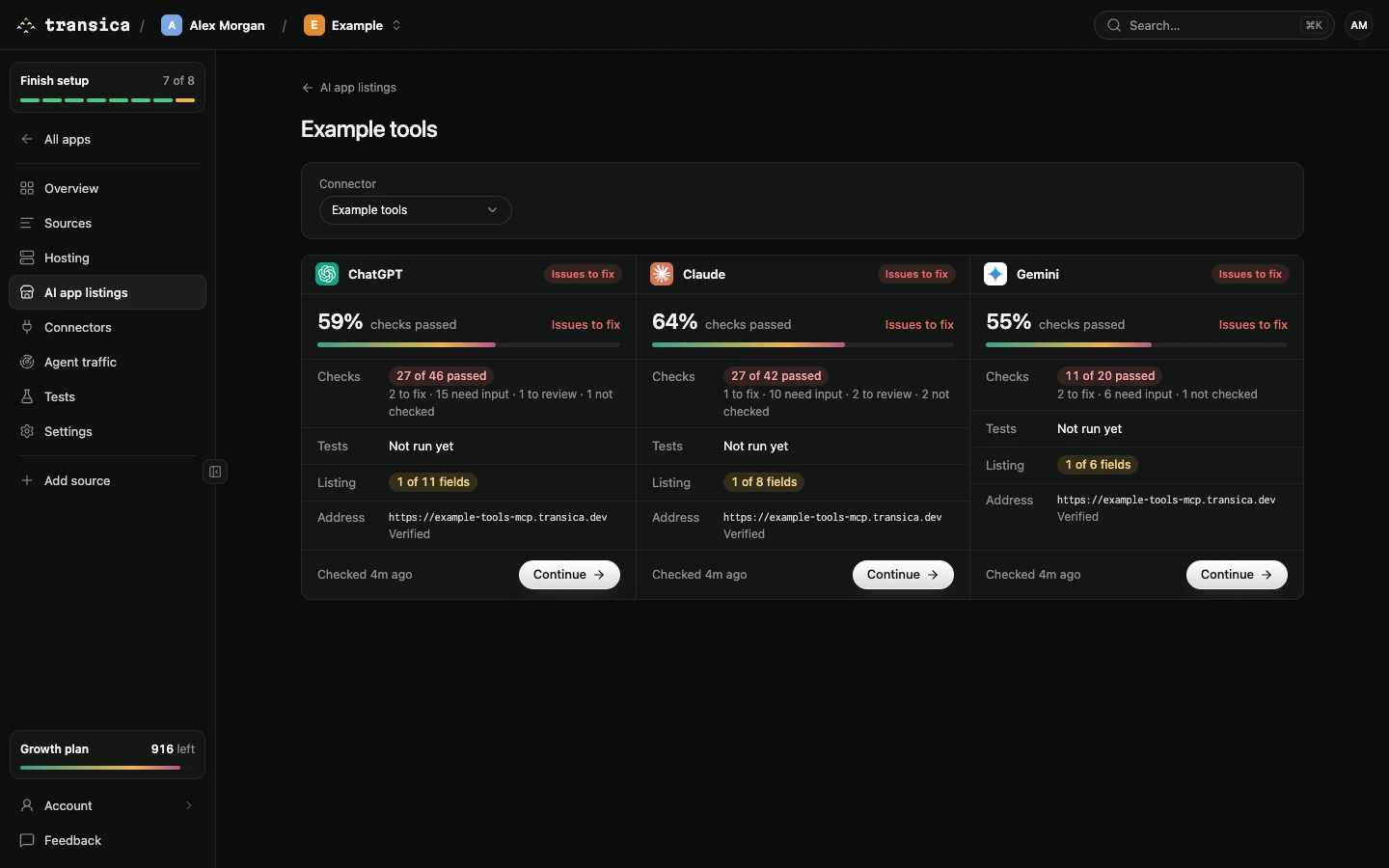
Yes. Each directory gets its own checks and its own package:
- ChatGPT. Transica checks every tool against OpenAI's rules, serves OpenAI's domain token on your address and builds the plugin ZIP. You upload it at platform.openai.com/plugins under your verified OpenAI identity. ChatGPT listing.
- Claude. The same checks against Anthropic's rules, and every field of the portal ready to copy. You submit at claude.ai/directory/manage. Claude listing.
- Gemini. Google's Connected Apps platform lists MCP apps in the Gemini app and in Search. It's in preview, so you apply first. Transica checks your app against Google's rules, serves Google's verification file and walks you through each Connected Console screen with the values ready to paste.
You still need a privacy policy, terms and a support page. If tools need sign-in, the reviewers need a test account without multi-factor prompts.
With the done-for-you service, Transica also records the demo video and submits to ChatGPT and Claude. OpenAI, Anthropic and Google decide, and Transica can't promise a listing.
What happens after the app goes live?
Transica hosts it at an address like yourapp-mcp.transica.dev. On Business, it runs on your own domain, such as mcp.yourcompany.com, with a branded sign-in page. You add one DNS record, and Transica checks you own the domain first.
- Health checks every 15 minutes, with an email when something breaks and when it recovers.
- Usage by AI app. Each tool call shows the tool, whether it worked, how long it took and which AI app called it. Arguments, results, tokens and IP addresses aren't stored.
- Rule and spec changes. Transica reads each directory's rules and the MCP spec's versioning page every day, and updates its checks and the hosted server when they change. On Business, it emails you when a rule changes and reruns your test prompts every week.
- Tool changes. Once you're listed, Transica shows what each tool change does to your listings before you publish it. A change that breaks a directory rule can't be published until you fix it.
How much does Transica cost?
| Plan | Price | What you get |
|---|---|---|
| Free | $0 | Building, testing, directory checks for ChatGPT, Claude and Gemini, and the submission package. No hosting |
| Maker | $19 a month | One live app on Transica's address, customer sign-in, health checks, 50,000 tool calls a month |
| Business | $99 a month | Three live apps, your own domain, branded sign-in, weekly test reruns, rule-change alerts, 500,000 tool calls a month |
| Growth | $299 a month | Ten live apps, Transica's review before you resubmit |
| Done for you | From $1,500 once, plus hosting | Transica builds, hosts and lists it for you |
Tool calls are fair use, so going over is never billed. Yearly plans get two months free.
Can Transica do all of it for me?
Yes. With MCP server development, Transica's team does the work:
- Call. Go through your site or API and pick the actions customers ask for.
- Build. Tools, sign-in and hosting, tested in ChatGPT and Claude.
- Submit. Both directories, with the demo video, test prompts and reviewer account.
- Review. Answer reviewer feedback and resubmit when asked.
You verify your business with OpenAI and give Transica a test account. If you have developers, they review the tools.
What doesn't Transica do?
- No workflow builder. A tool Transica builds calls one endpoint, once. ChatGPT or Claude can still call several tools in a row. Steps that must happen together belong behind one endpoint in your API.
- One set of scopes. Every signed-in tool shares the same OAuth scopes. Asking for more access later, called step-up, isn't built yet. Leaving write tools off is how you block writes.
- Actions need a backend. A site with only public pages gets read-only tools.
- Only your own sites. You prove you own a site before Transica tests, hosts or lists it.
- No promised listing. The directories decide, and Transica can't speed up a review.
How does Transica compare with other MCP services?
Hosting platforms run a server you write. API-to-MCP and website-to-MCP tools build a server for you.
| Kind of service | Who builds the server | Customers' sign-in | ChatGPT and Claude listings |
|---|---|---|---|
| Transica | Transica, from your website or OpenAPI spec | Your existing login | Checks, test prompts and package; done for you on request |
| MCP hosting, such as Glama | You, or an open-source author | OAuth handled at Glama's gateway | Not included; public servers list in Glama's own directory |
| Cloud hosts: Cloudflare Workers, Google Cloud Run, Azure | You, in code | Your code | Not included |
| API to MCP, such as 0mcp | 0mcp, from your API spec | The AI app's token passed to your API; you bring the OAuth server | Not mentioned on its site |
| Website to MCP, such as MCPsnap (no-code options) | MCPsnap, from your public pages or an OpenAPI spec | Not mentioned on its site | Unnamed "MCP registries" |
| Workflow tools, such as n8n | You, one workflow per tool | A bearer or header key, or an n8n account | Not included |
| MCP platform with a helper, such as Alpic | You, in code | Your OAuth code | A helper drafts the package; you submit |
Common questions
Can I try Transica for free?
Yes. Building, testing and the directory checks are free. Without an account, you can check an MCP server against the directory rules or scan a page.
Do I need an API or API docs?
No, not to start. AI agents can explore your website and draft the tools. Actions and customers' own data do need an API, or something like one, behind your site.
Do I own the MCP server and the listing?
Listings are submitted under your own name, from your own OpenAI and Claude accounts. On Business, the app runs on your own domain, so the address stays yours if you leave. You can download any tool version as MCP tool definitions, an OpenAPI draft or a build guide, and host it yourself. Plans can be cancelled anytime.
What if a directory rejects the app or asks for changes?
Fix what the reviewers flagged and submit again. Transica shows which checks fail and reruns the test prompts. On Growth, Transica reviews it before you resubmit. With the done-for-you service, Transica answers the feedback and resubmits for you.
Has an app built with Transica been approved?
Yes. WarrantyWarden, our warranty-tracking app, was built with Transica. Its ChatGPT plugin was submitted by 13 October 2026 and approved on 29 October 2026 (the timeline). Transica's own plugin is in ChatGPT's directory too.
Sources
All read on 26 November 2026.
- Transica: Pricing, MCP server development, WarrantyWarden in ChatGPT's plugin directory, Transica in ChatGPT's plugin directory
- OpenAI: Upload and submit your plugin
- Anthropic: Submit a connector to the directory
- Google: Connected Apps, Build an MCP server for Connected Apps
- Others: Glama MCP hosting, 0mcp authentication model, MCPsnap, n8n MCP Server Trigger, Alpic submission helper