Add a test account
A test account is a login on your site that agents use to test pages behind sign-in. It's optional: without one, agents only read what's public.
You need: a verified site and a dedicated account on it. Who: admins.
Use a dedicated account
Never use a real customer's account. Create one for testing with realistic but synthetic data. Agents may make changes with it (only those you allow), and records they create during write trials are removed afterwards.
Add it
- Open Site settings → Test accounts and select Add test account (or do it in step 3 of guided setup). Test accounts unlock once the site is verified.
- Fill in:
- Name: how it appears in pickers and reports, for example "Customer" or "Admin".
- Email or username and Password: the password is stored encrypted and never shown again.
- Sign-in page: the address of your login page on your site (filled in as
/login; change it if yours differs).
- Optional: open Advanced sign-in settings for unusual login pages: Form submission URL, HTTP method, Page to check after sign-in and Text shown when signed in. Left blank, they're detected automatically.
- Select Save test account.
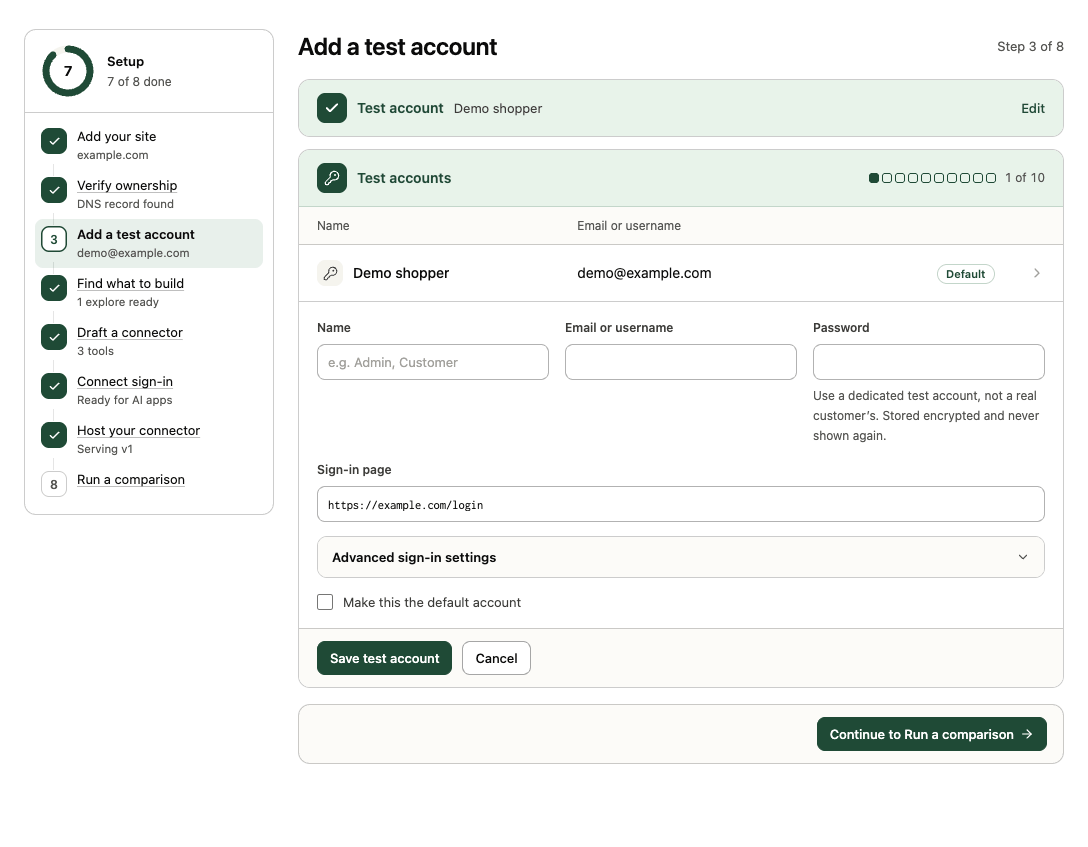
The first account you add becomes the site's default. You can add up to 10 per site, for example one per plan tier, and pick one when you start a test or comparison. Open an account in the list to Edit it (leave the password blank to keep it), Make default or Remove it. If you remove the default, the oldest remaining account takes over.
How it's used
- AI browser tests and explores sign in through your login page in an isolated browser. Transica detects the credential submission, checks the session, and only then allows changes. Redirects that resend credentials, rejections and challenges stop the run instead of retrying.
- AI connector tests and comparisons sign in as the account through your connector's sign-in, exactly like an AI app would.
- Get listed uses one as the reviewers' account.
- Reports say "Signed in as name (username)" and record the sign-in outcome.
Next: Run an AI browser test.