Connectors
A connector is the app AI assistants use: a versioned set of tools built from your API. The Connectors section lists them and is where you build new ones.
Where: sidebar → Connectors (/dashboard/sites/<site>/connectors). Two tabs: All connectors and New connector.
All connectors
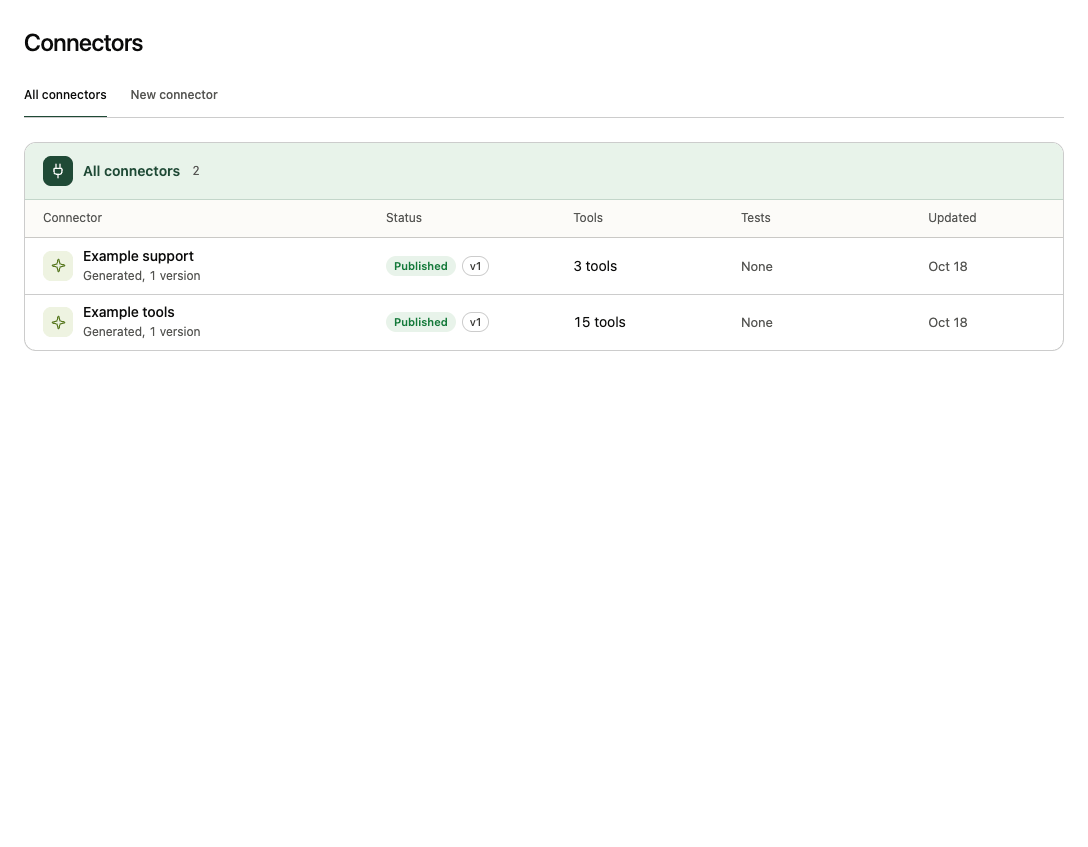
| Column | Meaning |
|---|---|
| Connector | Name and how it was made (Generated or Your MCP server, and its number of versions). Select the name for the connector page. |
| Status | Building (created, no version yet), Draft, Published or Unpublished, with the published version (v1). |
| Tools | Tools in the latest version, with how many change data (2 write). |
| Tests | Connector tests and comparisons that used it, and when the last one ran. |
| Updated | Last change. |
New connector
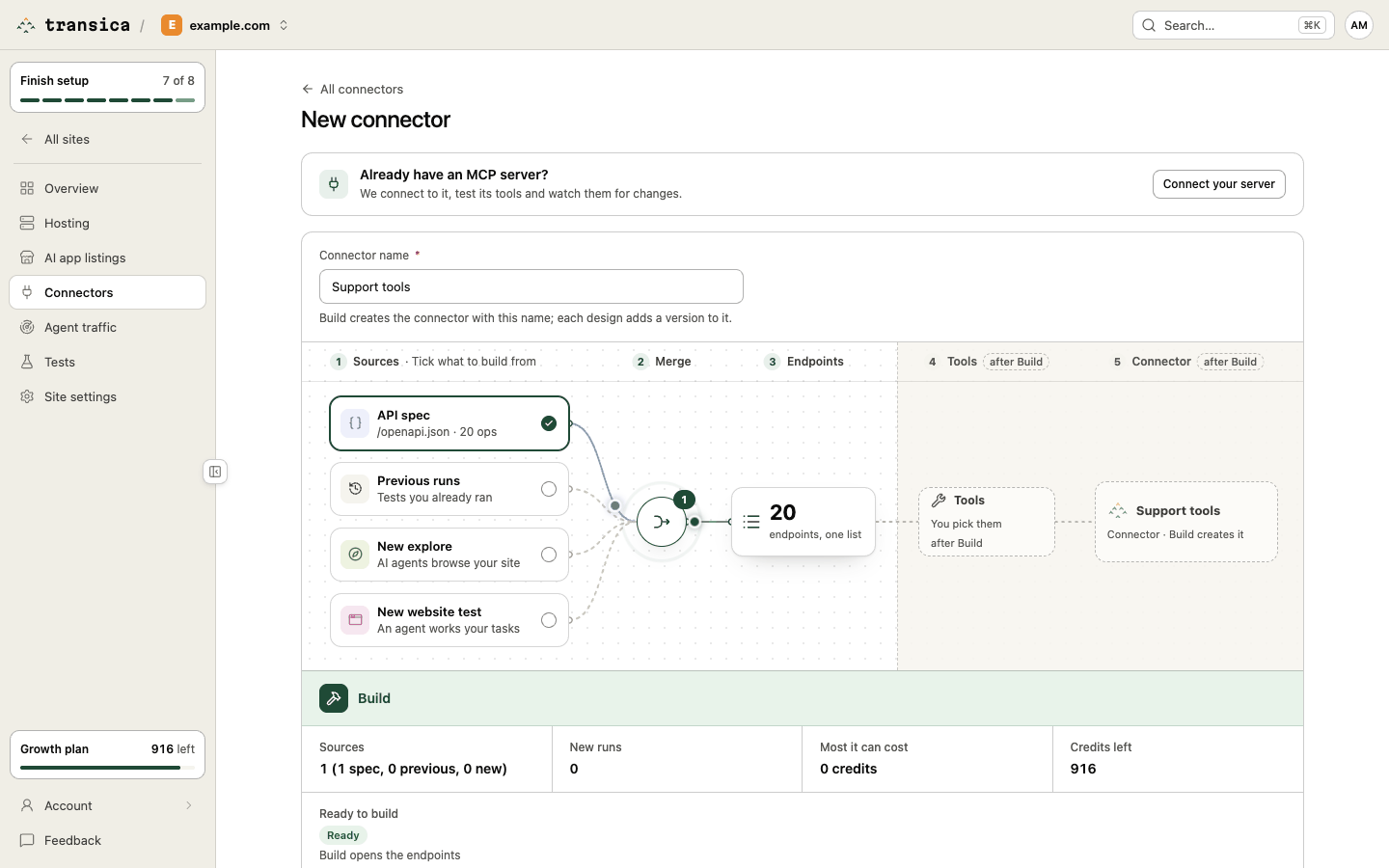
New connector opens the build canvas (/connectors/build). Building a connector starts with a Connector name and one or more sources: each source you tick is wired into a merge node that produces one list of endpoints. Select a ticked source to open its drawer.
| Source | What it adds |
|---|---|
| API spec | Your documented endpoints. If we found a public spec on your site it's pre-filled; otherwise choose Found on your site, Upload JSON file, From an address or Paste a spec. OpenAPI 3.0 or 3.1 JSON, up to 1 MiB and 1,000 operations. A copy is kept with the connector so new versions don't ask for it again. |
| Previous runs | Endpoints observed in tests you already ran: search and tick finished AI browser tests and explores (newest first). They cost nothing more. |
| New explore | Plans an explore; Build starts it. |
| New website test | Plans an AI browser test with a Test name, tasks you write (or a task set) and Runs per task; Build starts it. |
Any mix works, including a spec on its own, up to 10 tests and runs in all. The Build panel shows Sources, New runs, Most it can cost (unused runs are refunded), Credits left, and Ready to build with anything that still needs attention. Select Build: the connector is created at once (status Building), new runs start, and the canvas turns into the endpoint picker.
Already have an MCP server? The panel above the canvas has Connect your server, which takes a server address (Streamable HTTP) and an optional bearer token instead. See Connect your own MCP server.
Select the endpoints to turn into tools
Where: after Build, or Design new version on a connector (/connectors/endpoints?connector=<id>).
- Building from: the Connector name, how many Sources are usable, and the Endpoints found (or Waiting for n of m while runs finish). Each source shows its state (Waiting, Running, Done, Failed) with View test; sources that failed are listed under Left out. Change sources goes back to the canvas. You can leave the page while runs go on.
- What the agents recorded (when tests are sources): agent sessions, requests captured and endpoints.
- AI designs left this month: designs are counted per plan (Free 3, Maker 20, Business 100, Growth 300). Failed designs don't count.
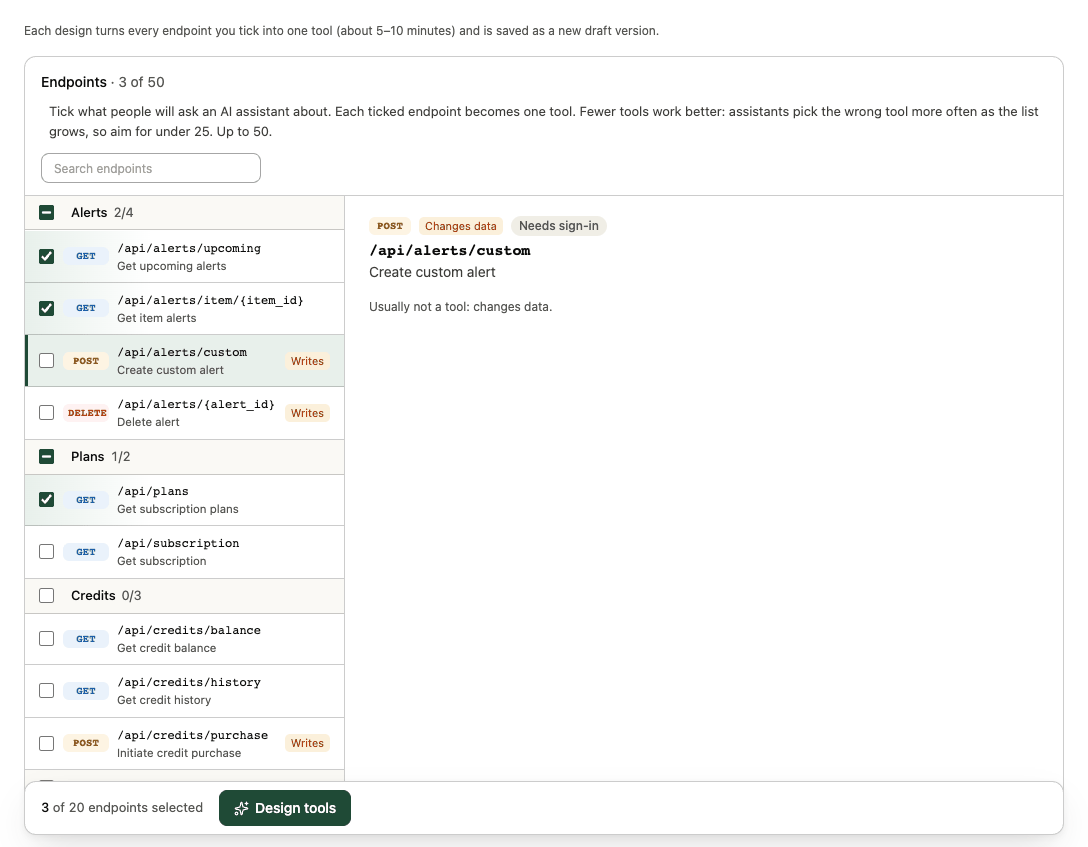
- Endpoints · n of 50: grouped by area (for example Alerts, Inventory), with search. Each row shows the method, path, summary and tags: New (since the latest version), Page (a documented page that returns HTML, read as text), Writes (changes data) or High risk (left out and never run). Select a row to see its parameters, whether it needs sign-in, what agents used it for and where it was seen.
Tick what people will ask an assistant about; each ticked endpoint becomes one tool. Fewer tools work better (assistants pick the wrong tool more often as the list grows), so aim for under 25. On a new connector nothing is pre-ticked; for a new version, the previous version's endpoints are.
Select Design tools. The design runs in the background (usually 5–10 minutes) and saves a new draft version; you review it on the connector page. Earlier designs are listed under Designs of this connector. See Design, review and publish tools.