Site overview
A site's home page: what to do next, the key numbers, and the state of its listings, traffic and hosting.
Where: select a site, then Overview in the sidebar (/dashboard/sites/<site>).
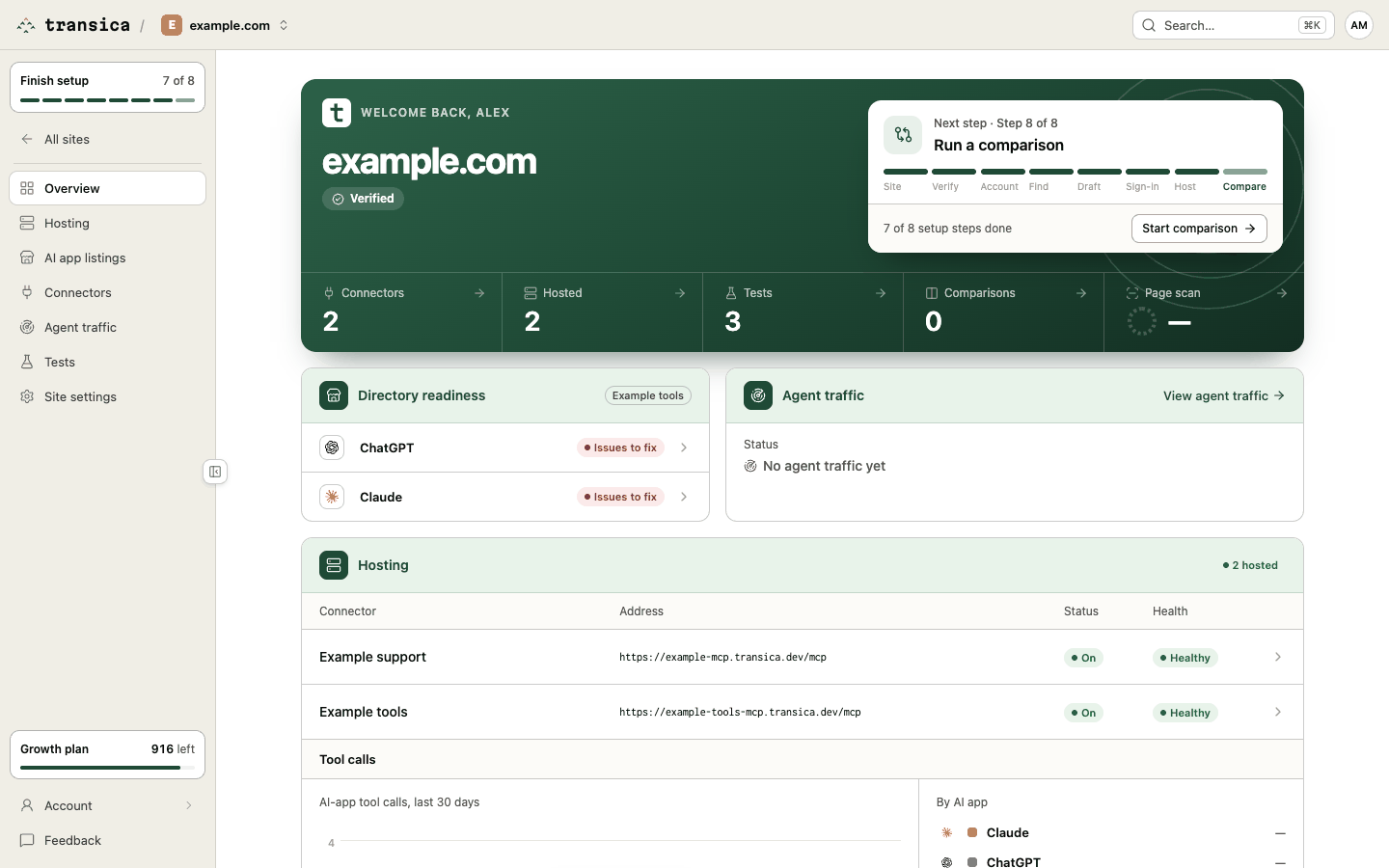
What's on it
Welcome. The site's address and its ownership status: Verified, or Not verified with a link to Site settings → Ownership.
Next step. One card with one button:
- During setup: "Next step · Step 3 of 8", the step's title (for example "Add a test account") and a progress bar with each step's short name (Site, Verify, Account, Find, Draft, Sign-in, Host, Compare). The button opens that step of guided setup.
- While an explore or comparison runs: Running now, with View progress or Open comparisons.
- Once setup is done: Suggested, either Schedule weekly runs for your latest comparison or New comparison.
Numbers. Connectors, Hosted, Tests, Comparisons and the latest Page scan score. Each opens its page.
Directory readiness. Once the site has a connector, one row each for ChatGPT and Claude, for the hosted connector (or the first one). Before you submit, the row shows readiness (Ready, Needs input, Issues to fix or Not checked); after, the submission's status (Submitted, In review, Changes requested, Approved, Published, Rejected or Withdrawn). Each row opens that directory's Get listed flow.
Agent traffic. Once you've connected a traffic source: AI assistant visits per day before and after hosting, connector calls per day and how many days are compared. Until there's enough data it says so. View agent traffic opens Agent traffic.
Hosting. An overall status (Off, Not checked yet, Healthy, Warning or Failing) and the request path as a diagram, with a live status on each part:
AI app → Your sign-in → Transica hosting → Your API
With more than one hosted connector, the status counts them ("2 hosted", "1 failing") and the diagram becomes a list (Connector, Address, Status, Health); open a row for its version, sign-in, endpoints up and last check.
Below it, Tool calls: AI-app tool calls over the last 30 days, per day and By AI app, with Calls, Error rate, Latency p50, Latency p95 and Sessions, and the steps from Agent visits to Catalog reads, Sessions and Tool calls.
Related
- Guided setup for the next step.
- Hosting for the full hosting review.
- Monitor health, usage and traffic.