Hosting
Hosting serves a published connector over MCP at one permanent address, behind the sign-in your customers already use. This page is where you turn it on, decide which tools may change data, connect sign-in, and hand AI apps the address.
Where: sidebar → Hosting (/dashboard/sites/<site>/hosting). With more than one published connector, pick it under Connector at the top right. Hosting needs a paid plan (Maker and up); turning it on and off is for admins. Connectors for your own MCP server stay on your infrastructure and don't appear here.
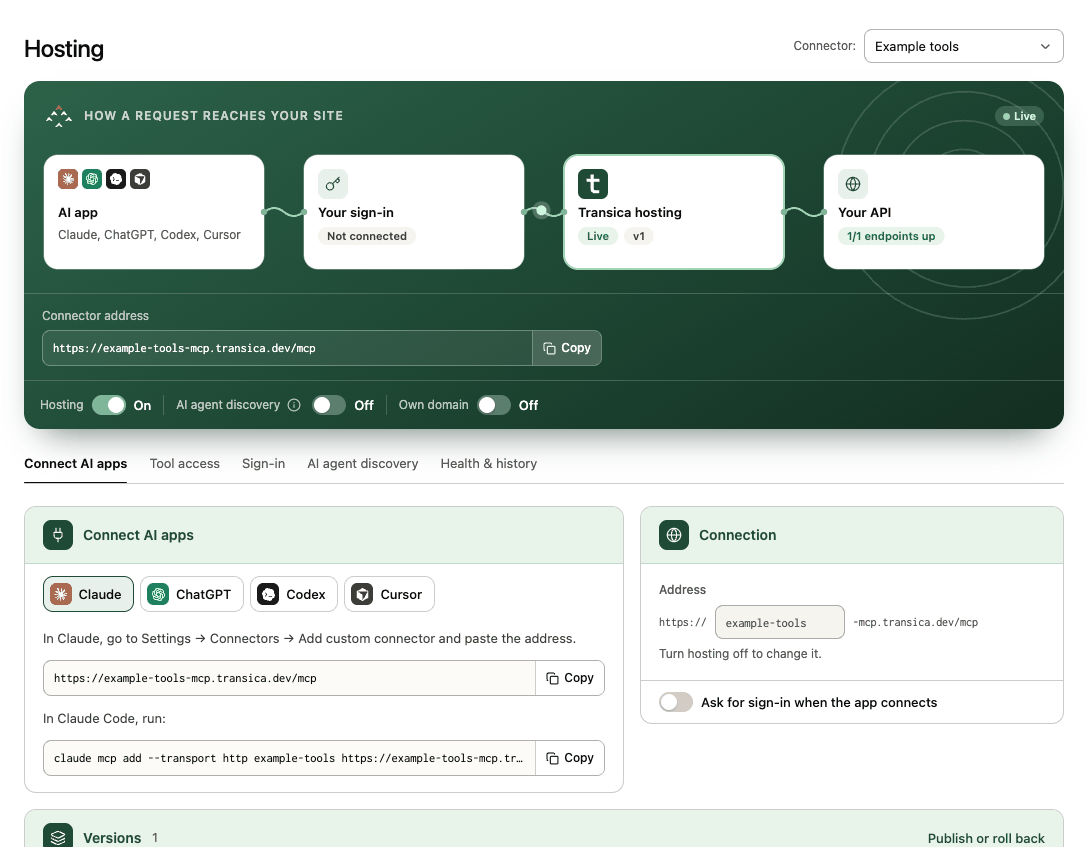
How a request reaches your site
The card at the top shows the path every tool call takes, each step with its live status:
| Step | Status examples |
|---|---|
| AI app (Claude, ChatGPT, Codex, Cursor) | — |
| Your sign-in | Your provider's name, or Not connected (fine when no tool needs sign-in) |
| Transica hosting | Live with the served version, or Off |
| Your API | 3/3 endpoints up, or Not checked (from health checks) |
Below it:
- Connector address, with copy: where AI apps connect,
https://<name>-mcp.transica.dev/mcp, or your own domain once it's set up. Directory listings use the same address. - Hosting switch: on or off (admins). With a setting still to do, it opens that tab instead. Turning hosting off wipes that connector's AI-app sign-ins and tokens, and any directory listing stops working until you turn it back on. A paused connector says why (for example, a failed payment).
- AI agent discovery switch: off by default; see the tab below.
- Own domain switch (Business and up): serve the connector at your own hostname. See Own domain.
Tabs
Connect AI apps
Copy-paste steps for Claude, ChatGPT, Codex and Cursor, with the address filled in. See Connect AI apps.
Beside them:
- Connection: the Address name (lowercase letters, numbers and hyphens; change it only while hosting is off, and not once a listing is submitted) and the Ask for sign-in when the app connects switch (the fallback when per-tool sign-in doesn't suit an app).
- Versions: which version is Live and which is Published, not yet live. Publishing a newer version doesn't change what's served: select Go live with vN to serve it. Publish or roll back opens the connector's Versions tab.
Tool access
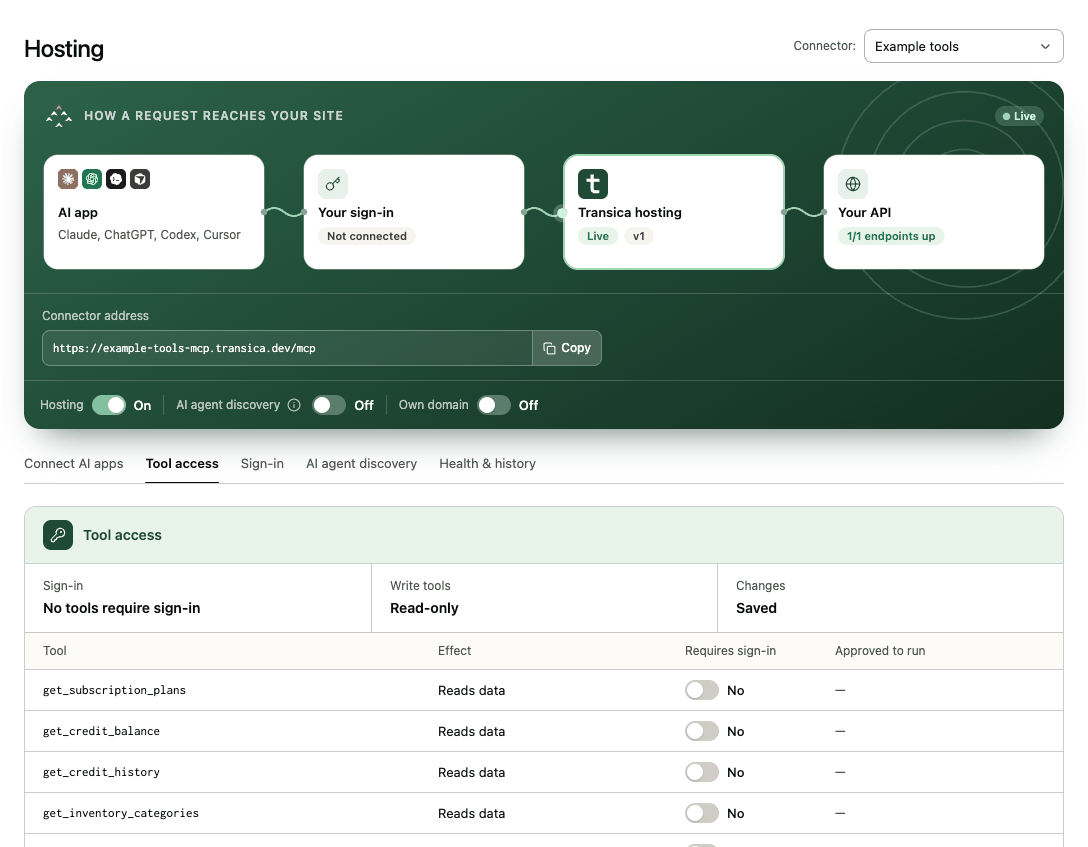
A summary (Sign-in, Write tools approved, unsaved Changes), then one row per tool: its Effect (Reads data or Changes data), Requires sign-in (Yes/No) and Approved to run. Select a tool for the evidence behind the sign-in recommendation (for example, Signed-out request returned 401).
Reads run once hosted. Tools that change data run only after an admin approves them here; high-risk actions (payments, account closure, credentials, messaging others) are never served. Tools that don't need sign-in answer signed out; an approved write tool that doesn't need sign-in is marked Anyone can run this and is capped at 1,000 calls a day. Confirm access the first time; later changes need Save and apply.
Sign-in
How people sign in when an AI app calls a tool that needs it: the Transica consent screen first, then your provider's own login, so tools act as that person.
- Issuer URL with Detect, and the Sign-in provider: Supabase, Clerk, Auth0, WorkOS, Descope, Stytch, Better Auth, Logto, Keycloak or any other OAuth / OpenID provider.
- Client registration: dynamic client registration, Client ID Metadata Document, or a client you created (Client ID and Client secret; the secret is kept only on the hosting service). The Callback URL and your provider's Setup steps are shown.
- Test sign-in runs the checks: OpenID configuration found, authorization code flow with PKCE enabled, API audience set, tokens signed with asymmetric keys, consent page published, API accepts OAuth access tokens, and the registration method. Discard changes goes back to what's served.
- Brand color (Business and up): the colour of the Allow button on the consent page, with a preview. Your listing's logo also appears on the sign-in pages from Business.
See Connect your sign-in provider.
AI agent discovery
Shown while hosting is on. Lets AI agents that visit your site discover the connector. Turn it on, then add one pointer to your site: a Link tag in your home page's <head> or an AI catalog file at /.well-known/ai-catalog.json (with optional llms.txt lines). Steps are shown for Next.js / Vercel, WordPress, Webflow, Shopify, static sites / Cloudflare Pages and others. Transica then serves an MCP server card and AI catalog for the connector, and checks each pointer on your site (Found, Not found, Blocked by robots.txt…).
Health & history
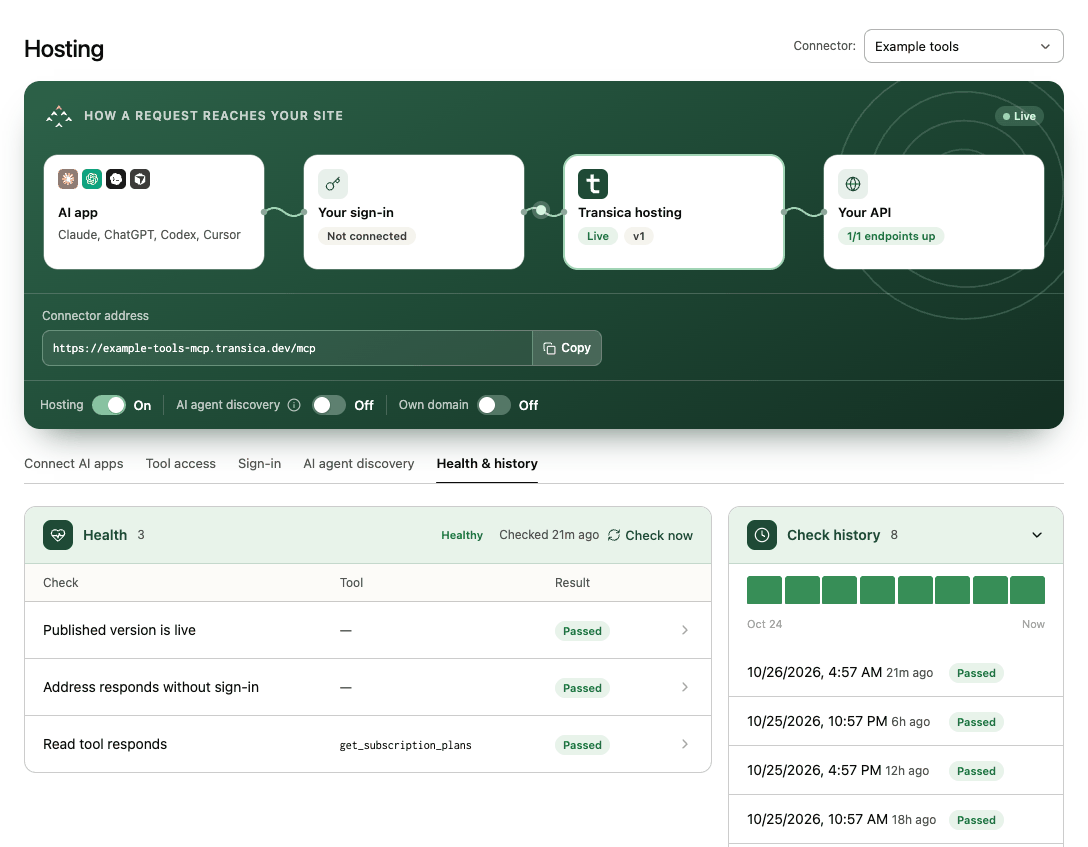
Every 15 minutes Transica checks that the published version is live, that the address asks for sign-in where it should, that sign-in works, that each read tool responds, and how a cold start responds, with evidence and folded Check history. Check now runs one immediately. A new failure or recovery emails admins once. A site that answers only after waking up gets a cold-start warning, not a failure. Checks never use your customers' credentials.
Own domain
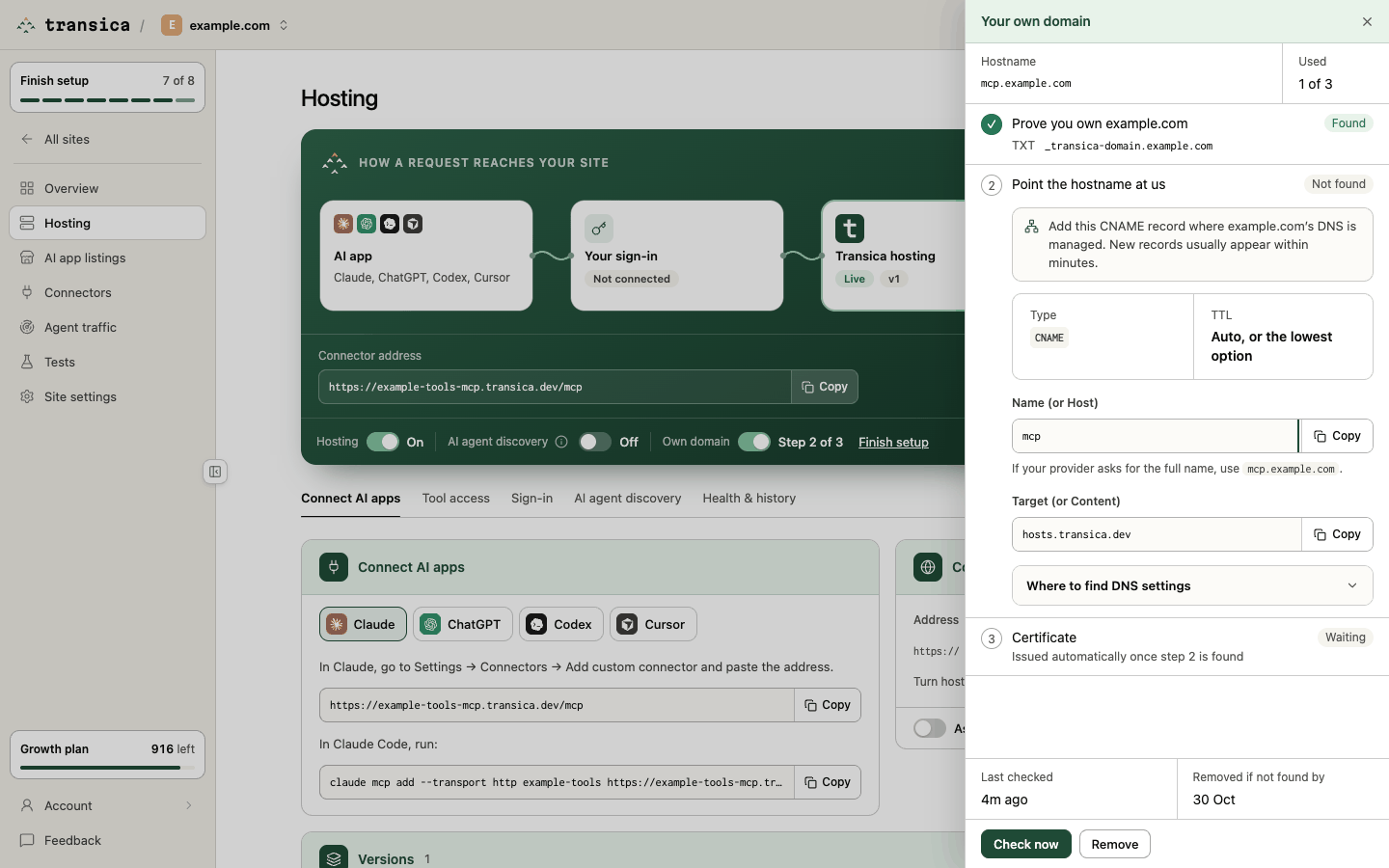
On Business and up, turn on Own domain to serve the connector at a hostname such as mcp.yourdomain.com. The drawer asks for the Hostname and shows how many of your plan's own domains are Used (Business 3, Growth 10, one more per extra app), then three steps:
- Prove you own the domain: a TXT record.
- Point the hostname at us: a CNAME record (Copy record, or set it up with your DNS provider where offered).
- Certificate: issued automatically once step 2 is found.
Check now looks for the records; a hostname not found within 7 days is removed. Once active, the connector address and any listing use your domain. Turning hosting off keeps it. While a ChatGPT or Claude submission uses the address, the switch is Locked. Turning it off (or Remove) falls back to the Transica address.