Design, review and publish tools
After you tick endpoints, an AI design turns them into tools AI assistants understand. You review the draft, adjust anything, and publish it as a version that can be tested and hosted.
Who: members and admins; publishing needs a verified site. Cost: one design from your plan's monthly allowance (Free 3, Maker 20, Business 100, Growth 300); failed designs don't count.
1. Start the design
On Select the endpoints to turn into tools, tick your endpoints and select Design tools. The design runs in the background and usually takes 5–10 minutes for up to 50 endpoints. You can leave and come back.
The design only translates: it creates one tool per ticked endpoint, with:
- a name in
snake_case(get_subscription_plans) and a title ("Get subscription plans"); - a description saying what it does, what it returns and when to use it;
- hints: Read-only (from the HTTP method), Destructive and Open world (set by the AI).
Safety, input schemas and sign-in always come from the endpoint itself, never from the AI. If a design misses an endpoint, it gets one fix-up round; if it's still incomplete, it fails and doesn't count.
2. Review the draft
The design is saved as a draft version and opens on the connector page, Tools tab.
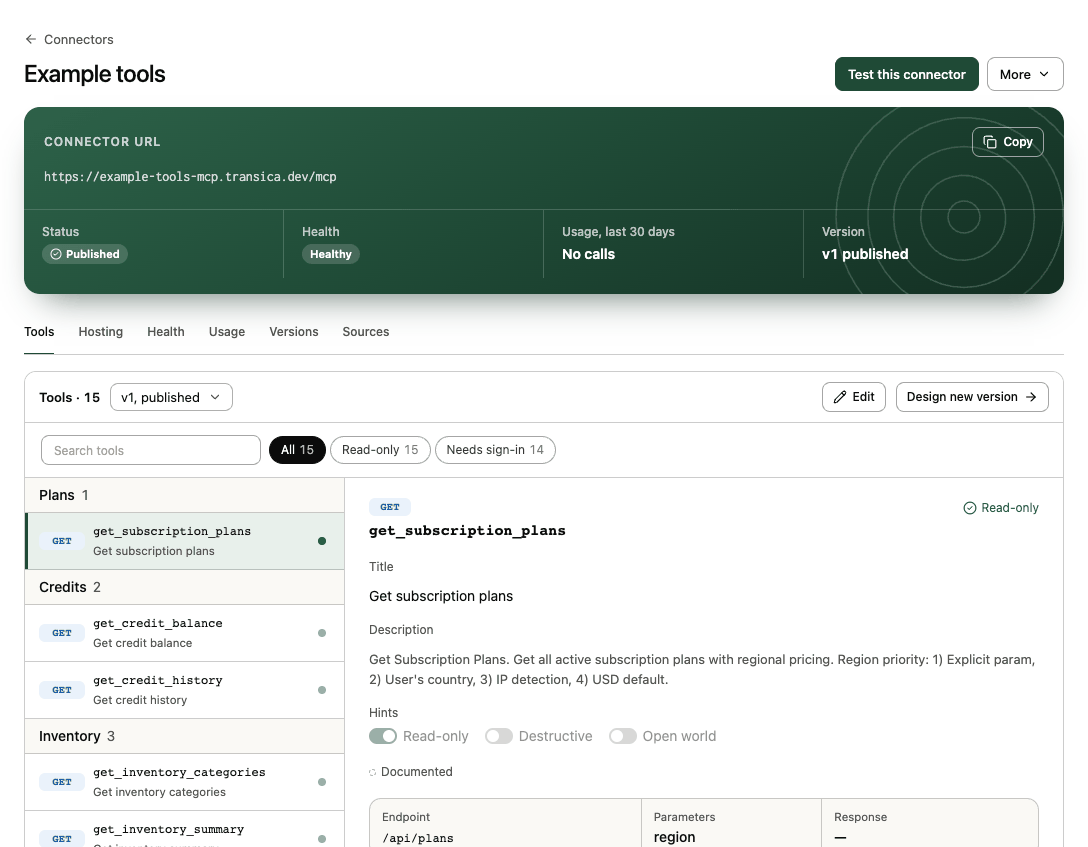
For each tool, check:
- The description would make sense to an assistant that has never seen your product. Does it say when to use this tool rather than another?
- Read-only tools really only read; tools that change data are marked so.
- Parameters have clear names and descriptions, with examples where useful.
- The Directories row shows Passes checks for ChatGPT and Claude.
Select Edit to change titles, descriptions and hints by hand (no AI). On a draft, Save vN updates it in place.
Tools marked Needs review show Check this before publishing in their detail. For each, choose Mark as reviewed, Edit tool or Leave it out.
3. Publish
Select Publish vN at the top of the page. It stays off until every Needs review tool is reviewed. A published version is what tests, comparisons and hosting use.
If the connector is already submitted to or listed in ChatGPT or Claude, you first see Review before publishing vN: what each change does to your listings. A change that breaks a platform rule keeps Publish off until you fix the tool.
Published versions are never deleted and never change. Editing a published version saves your changes as the next version (Save as vN); Design new version runs a new design from the current endpoints. Use the version menu on the Tools tab to view any version.
If the connector is hosted, publishing doesn't change what AI apps get: on Hosting → Connect AI apps, select Go live with vN to serve the new version.
4. Next
- Run an AI connector test to see agents use the tools.
- Host your connector to put it live.
- More → Download vN gives you the MCP tool definitions, an OpenAPI draft or a Build guide if you'd rather host it yourself.
Fewer, clearer tools win
Assistants choose between tools by name and description. Under 25 tools, each with a distinct purpose, beats 50 overlapping ones. Tool quality warns from 25 and suggests merges.