Host your connector
Put a published connector live at a permanent address that Claude, ChatGPT and other AI apps can connect to. Reads go live at once; changes run only once you approve them.
You need: a published connector, a paid plan (Maker and up; each plan includes live apps) and, if any tool needs sign-in, a connected sign-in provider. Who: admins turn hosting on and approve write tools.
Steps
- Open Hosting and, if you have several connectors, pick one under Connector at the top right.
- Tool access: review each tool's Effect and Requires sign-in. For each tool that changes data, decide whether to approve it to run. Unapproved write tools aren't served; high-risk actions are never served. Select Confirm access.
- Sign-in: if tools need sign-in, make sure Test sign-in passes (see Connect your sign-in provider).
- Connect AI apps → Connection: check the Address name.
- Turn the Hosting switch On. If something is still to do, the switch opens that tab instead.
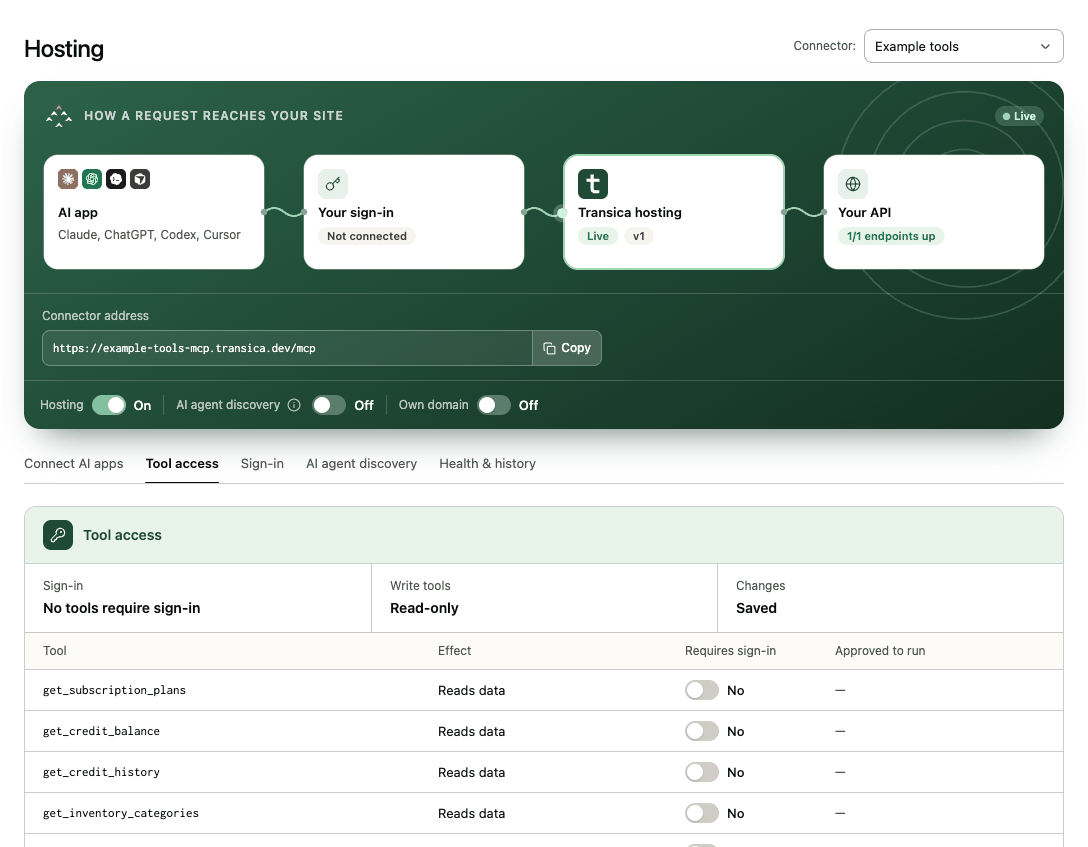
The request path at the top shows Transica hosting: Live with the version being served. The first health check runs within 15 minutes; select Health & history → Check now to run one straight away.
Guided setup's last step, Host your connector, does the same in place, with anything blocking it listed inline.
Your address
The connector is served at https://<name>-mcp.transica.dev/mcp. Change the <name> part under Connect AI apps → Connection while hosting is off (it's locked once a directory submission uses it). On Business and up you can serve it at your own hostname instead, such as https://mcp.yourdomain.com/mcp, with the Own domain switch (see Hosting). Directory listings use the same address.
Serving a new version
When you publish a newer version, hosting keeps serving the old one until you switch: on Connect AI apps → Versions, select Go live with vN. To roll back, select Publish or roll back, roll back on the connector's Versions tab, then go live with that version the same way.
Tools without sign-in
Tools set not to require sign-in answer AI apps signed out, and no credentials are sent to your API for them. Signed-out calls are rate-limited per caller and per connector, with a daily cap per plan. An approved write tool that anyone can call is capped at 1,000 calls a day.
Turning hosting off
Turn the Hosting switch off and confirm. That connector's AI-app sign-ins, clients and tokens are wiped; people reconnect when you turn it back on. A directory listing stops working while hosting is off. Your own domain, if set, is kept. You can't unpublish a connector or remove its site while it's hosted.
Next: Connect AI apps · Monitor health, usage and traffic