Manage your plan and credits
Choose a plan, add sites, buy credit packs and see where your credits went. Anyone in the organization can look; admins make changes.
Where: Account → Billing, or the plan chip at the bottom of the sidebar.
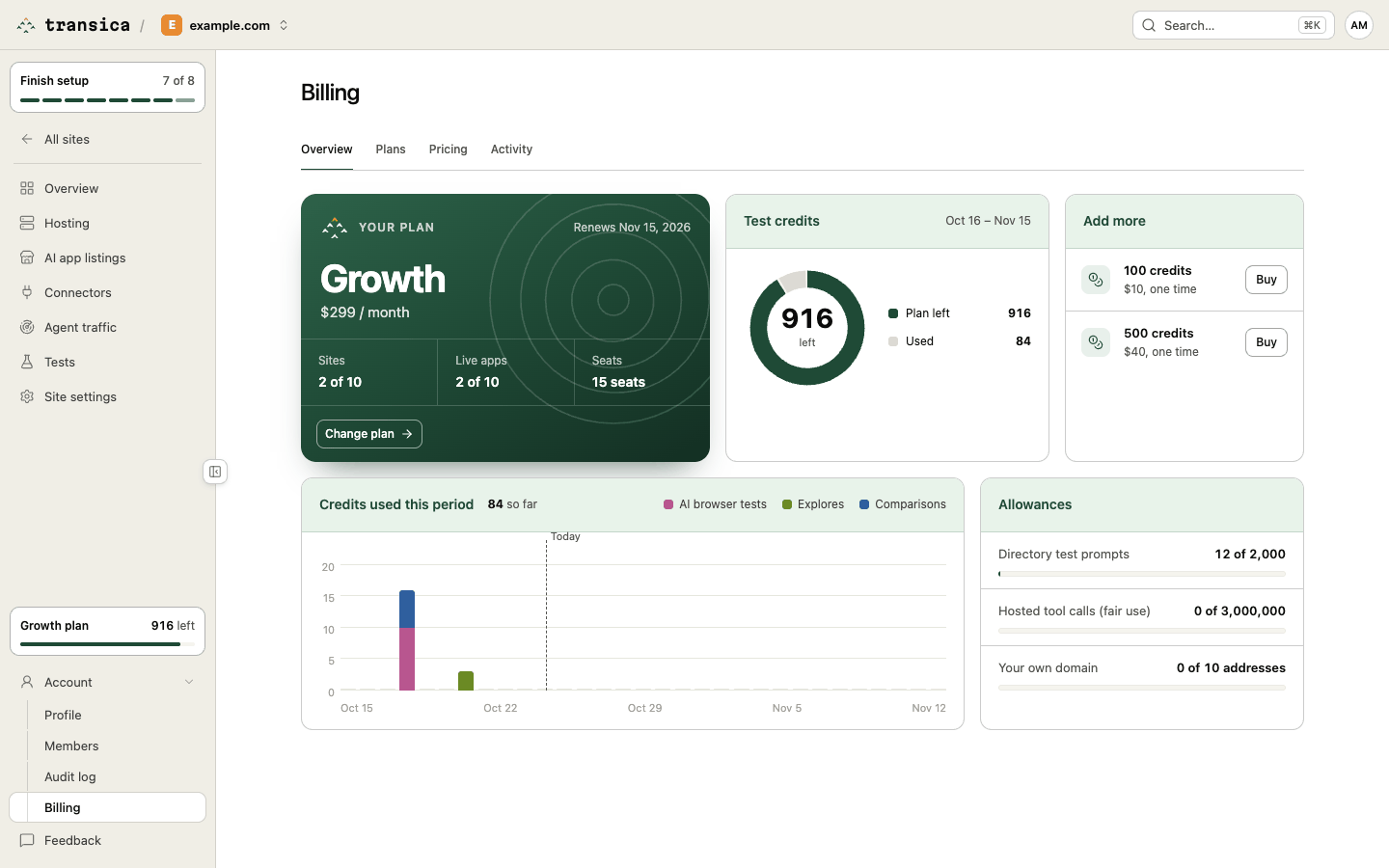
Change plan
- Select Change plan on the Overview, or open the Plans tab.
- Choose Monthly or Annual (2 months free).
- Tick the box to agree to the Terms and Refund policy.
- Select Upgrade to plan (or Switch to plan if you already pay) and complete the secure checkout.
Plan changes are prorated. A move to a smaller plan is refused until your sites and hosted apps fit it: turn off hosting or remove sites first. Payments are processed by Dodo Payments, our merchant of record. The launch offer gives the first 50 paying customers 25% off monthly plans for 6 months while places last.
Downgrade to Free (on the plan card) or Switch to Free (on the Plans tab) takes effect at the end of your billing period; until then, Keep current plan undoes it. Free has no hosting: after the plan ends, your live apps keep serving for 7 days, then hosting turns off.
Manage billing opens the payment portal, to update your card or get invoices.
Add a site and its live app
Each plan includes a number of sites, each with one live app (a hosted connector at one address). On paid plans, add extra sites for $29 a month each:
- On the Overview, find Extra sites in the Add more card.
- Use + and − to set how many you want, then select Save.
Each extra adds a site plus its live app (and, from Business, another own-domain address). Lowering the number is refused until your sites and live apps fit.
Buy credits
Plan credits renew each period and don't roll over. When you need more, buy a pack: 100 credits for $10, 500 for $40 or 2,000 for $120.
- On the Overview, select Buy next to 100 or 500 credits in Add more. (All three packs are under One-time purchases on the Plans tab.)
- Check the credits, price and Valid for (12 months), tick the terms box and select Buy for price.
Packs are used after your plan credits, earliest-expiring first. Refunds take back unspent pack credits.
Understand what you spent
- Test credits (Overview): credits left this period, split into Plan left, Packs left, Reserved and Used. Every test reserves its maximum when it starts and settles when it ends, so runs that never happened are refunded.
- Credits used this period (Overview): a daily chart of AI browser tests, explores and comparisons. AI connector runs are free.
- Allowances (Overview): directory test prompts, hosted tool calls (fair use, never billed) and own-domain addresses.
- Activity: every credit movement (tests, explores, comparisons, refunds for unused runs, credits added). Open a row to see what it was for.
- Pricing: what each kind of work costs.
What costs credits, and what doesn't: Plans and credits.
When your account is over its plan or a payment fails
Plan and extras changes are made here in Billing, which keeps you within your allowance. If your account ends up with more sites or live apps than the plan allows, or a payment fails, you have 7 days to sort it out. Admins get an email when it starts, on day 5, on day 7 and when it's fixed.
After 7 days the account is suspended: tests, explores, comparisons, directory test prompts, weekly runs, new connectors and versions, new sites and turning hosting on are paused, and a red note on every dashboard page says why. Hosted tool calls, health checks, viewing, Billing, turning hosting off and removing sites keep working, except that a failed payment also turns hosting off. Everything resumes as soon as the account fits again (remove sites, turn hosting off, add extra sites or change plan) or the payment goes through.
Done-for-you listing
Prefer us to do it? The $1,500 one-time service builds your app, records the demo video, prepares the ChatGPT and Claude submissions and supports you through review. Buy it under One-time purchases on the Plans tab, or talk to us.