Monitor health, usage and traffic
Once a connector is live, Transica watches it for you: health every 15 minutes, every tool call by AI app, agent traffic on your site, and email when something needs you.
Health
Where: Hosting → Health & history, or the connector page's Health tab.
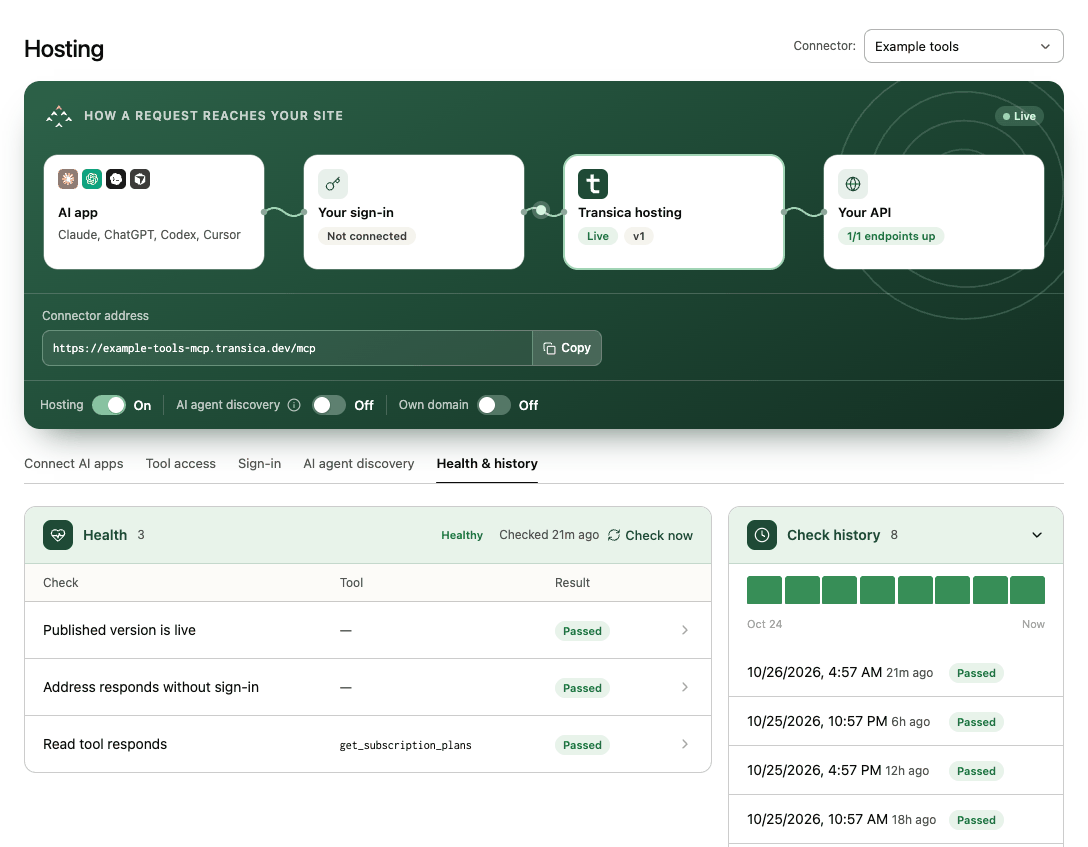
Every 15 minutes Transica checks the served version, your sign-in address and provider, and each read endpoint, and keeps the evidence and recent history. Check now runs one on demand.
- A new failure or a recovery emails admins once (not every 15 minutes).
- A connector that only answers after waking up (scale-to-zero hosting) is marked slow to wake: a warning with one weekly email, and a note in Get listed, because directories expect the first call to answer in time.
- Checks never use your customers' credentials; inputs Transica doesn't have are labelled not checked.
Usage
Where: the connector page's Usage tab, and Tool calls in the Hosting card on the site overview.
For every tool call through hosting, Transica records the tool, outcome, error class, latency, sign-in mode, the AI app (Claude, ChatGPT, Cursor, Codex or other), a daily-rotating anonymous session and the argument names. Never argument values, results, tokens or IP addresses. History is kept per plan: Maker 7 days, Business 90 days, Growth 13 months.
If your organization goes over its plan's tool calls two billing periods in a row, Billing and Hosting show an upgrade note. Nothing is charged or paused.
Agent traffic
Where: Agent traffic, and the Agent traffic card on the site overview. Connect a data source first (upload an access log, or connect Cloudflare). See Agent traffic.
You'll see which AI agents visit and what they reach, and AI assistant visits per day before and after hosting. Once a connector is hosted, the steps Agent visits → Catalog reads → Sessions → Tool calls show on the overview's Tool calls and the connector's Usage tab.
Email alerts
Choose them in Account → Settings → Email notifications:
| Alert | Default |
|---|---|
| Hosting outages, recoveries and slow starts | On |
| Weekly comparison regressions | On |
| MCP server tool changes | On |
| Low usage balance | On |
| ChatGPT and Claude listing rule changes (Business and up) | On |
| Finished tests and comparisons | Off |
| Agent traffic and connector alerts (spikes, drops, error jumps, new agents; daily) | Off |
Every notification email has an Unsubscribe from these emails link that turns off only that kind. Emails about your account's payments and plan allowance always go to admins; see Manage your plan and credits.
A healthy routine
- Glance at the site overview weekly: hosting status, tool calls by app, directory readiness.
- Keep a weekly comparison on your main connector (Business and up). See Schedule weekly comparisons.
- After any API change, run an AI connector test before you serve a new version.