Connector page
Everything about one connector: its address, status and health at a glance, its tools at any version, and tabs for hosting, health, usage, versions and sources.
Where: select a connector on Connectors → All connectors (/dashboard/sites/<site>/connectors/<connector>).
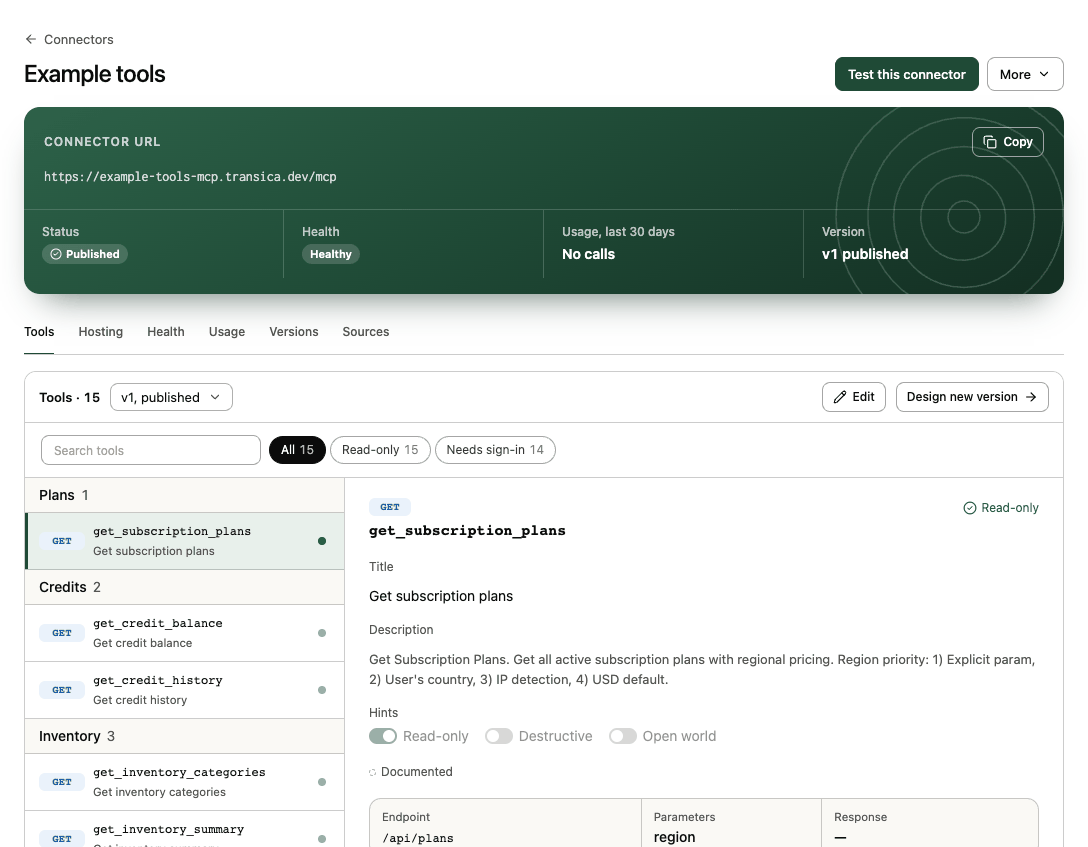
Header
- One primary button, the likeliest next step: Publish vN while the latest version is an unpublished draft, Turn on hosting for a published connector that isn't hosted, Test this connector once it's live, or Republish after an unpublish.
- More: Test this connector and Compare with AI browser test, List in directories (opens AI app listings), Download vN (MCP tool definitions, OpenAPI draft or Build guide), and Unpublish (refused while the connector is hosted).
Overview
| Fact | Meaning |
|---|---|
| Connector URL | The hosted address AI apps connect to, once hosted (Hosting off or Not hosted otherwise). |
| Status | Draft, Published or Unpublished. |
| Health | The latest hosting health check (Healthy, Warning, Failing); Not monitored for your own MCP server. |
| Usage, last 30 days | Tool calls from AI apps, with the error rate when there are errors. |
| Version | The published version, and any newer draft. |
Once AI apps call it, an AI-app calls card shows the last 30 days. Needs attention lists what's left, each with a link: verify the site, review an unpublished version, a failing health check, or hosting still serving an older version.
Tools tab
The heart of the page. The bar holds the version menu (v1, Published; view any version with ?version=N), Built from n sources (opens Sources), Edit and Design new version.
The list groups tools by area with filters (All, Read-only, Changes data, Needs review…) and search. Select a tool for its detail:
- Title and Description: what AI apps read to decide when to call it.
- Hints: Read-only, Destructive and Open world (greyed switches outside Edit).
- Where it came from (Documented, Observed, Page), the Endpoint, Parameters and Response.
- Directories: whether the tool passes the ChatGPT and Claude tool rules (Passes checks, n to review or Blocks listing).
- For a tool that changes data on a hosted version, whether it's Approved in hosting.
Edit lets you change titles, descriptions and hints without AI: Save vN updates a draft in place; on a published version, Save as vN saves your changes as the next version. Design new version opens the endpoint picker with the current endpoints pre-ticked.
Tools that need review
A draft tool marked Needs review shows Check this before publishing in its detail: what it calls, its inputs and whether it changes data. Choose Mark as reviewed, Edit tool or Leave it out. Publish stays off until every such tool is reviewed.
Publishing a listed connector
When the connector is submitted to or listed in ChatGPT or Claude, publishing (or rolling back) first shows Review before publishing vN with Your listings: each change (a tool added, renamed or removed, a changed hint or sign-in) and what it means for each platform. If a change breaks a platform rule, Publish stays off and a link takes you to the tool to fix.
Other tabs
| Tab | What it shows |
|---|---|
| Hosting | The Live version and when people Sign-in (Not required, On connect or On first tool that requires sign-in), and Open Hosting for the full hosting page. Before hosting: Turn on hosting. |
| Health | Health checks of the hosted connector: served version, sign-in, each read tool and cold starts, with Check now and folded check history. |
| Usage | Tool usage (calls, error rate, latency p50 and p95, sessions) by day and by AI app; From agent visit to tool call (agent visits, catalog reads, sessions, tool calls); Per tool; and Errors with a fix for each kind. Call logs are kept per plan (Maker 7 days, Business 90 days, Growth 13 months); arguments and results are never stored. |
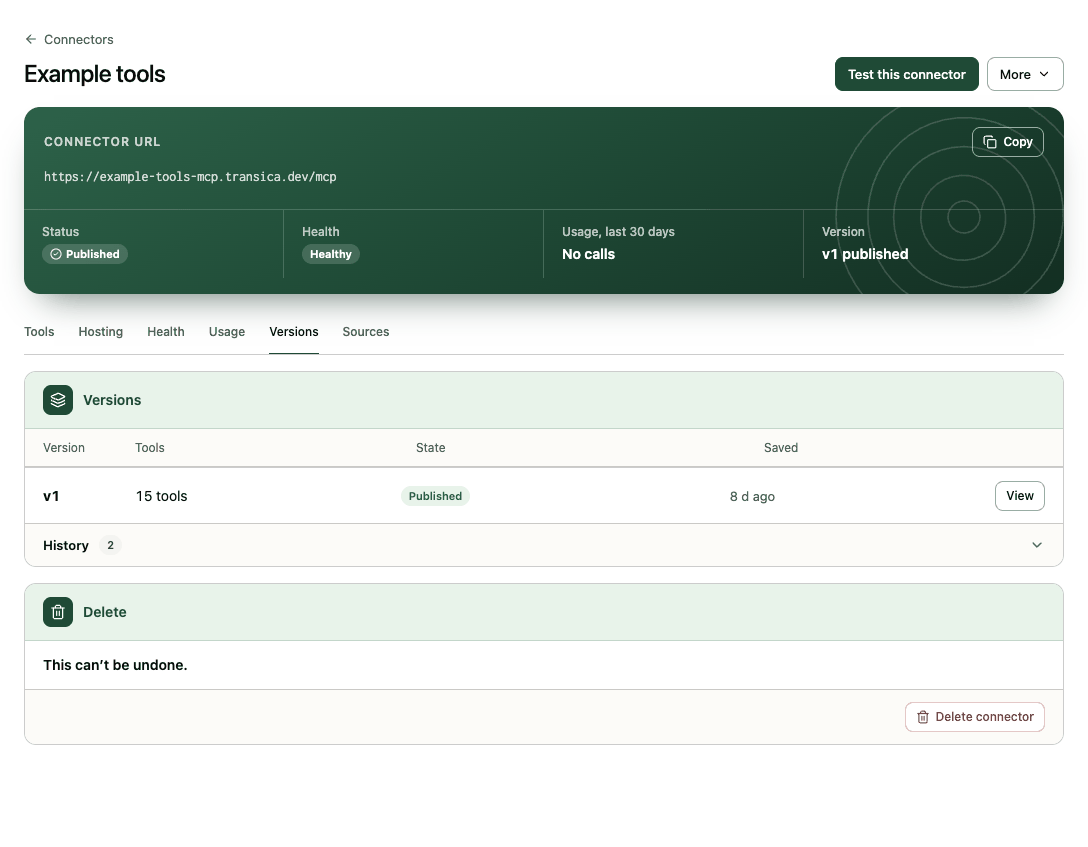
| Versions | Every version with its tool count, state (Draft, Published, Was published) and when it was saved; View any of them, Publish a newer one or Roll back to an earlier one. Versions are never deleted. History lists creates, saves, publishes and rollbacks. |
| Sources | The API spec, tests and explores the connector is built from, each with its kind, status and View; Edit sources and Design new version. |
Your own MCP server
For a connector made from your own MCP server the tabs change:
- Hosting shows the MCP server card: server, version, token, last imported, with Re-import tools and Edit connection.
- Health shows Tool changes: with Check tools every 6 hours on (the default), Transica re-reads the tool list, saves a new version when it changed, stores the difference and re-runs the latest comparison once.
- Usage isn't tracked: calls go straight to your server.
Delete connector
At the bottom (admins only, once no test or comparison is running): turns hosting off, removes any directory listing and the connector's versions, health checks and usage data. Test and comparison reports that used it are kept. A hosted or submitted connector asks you to type its name to confirm. This can't be undone.