Sources
Where an app's tools come from: its website, its API, or an MCP server it already runs.
Where: sidebar → Sources, or /dashboard/sites/<source>/sources.
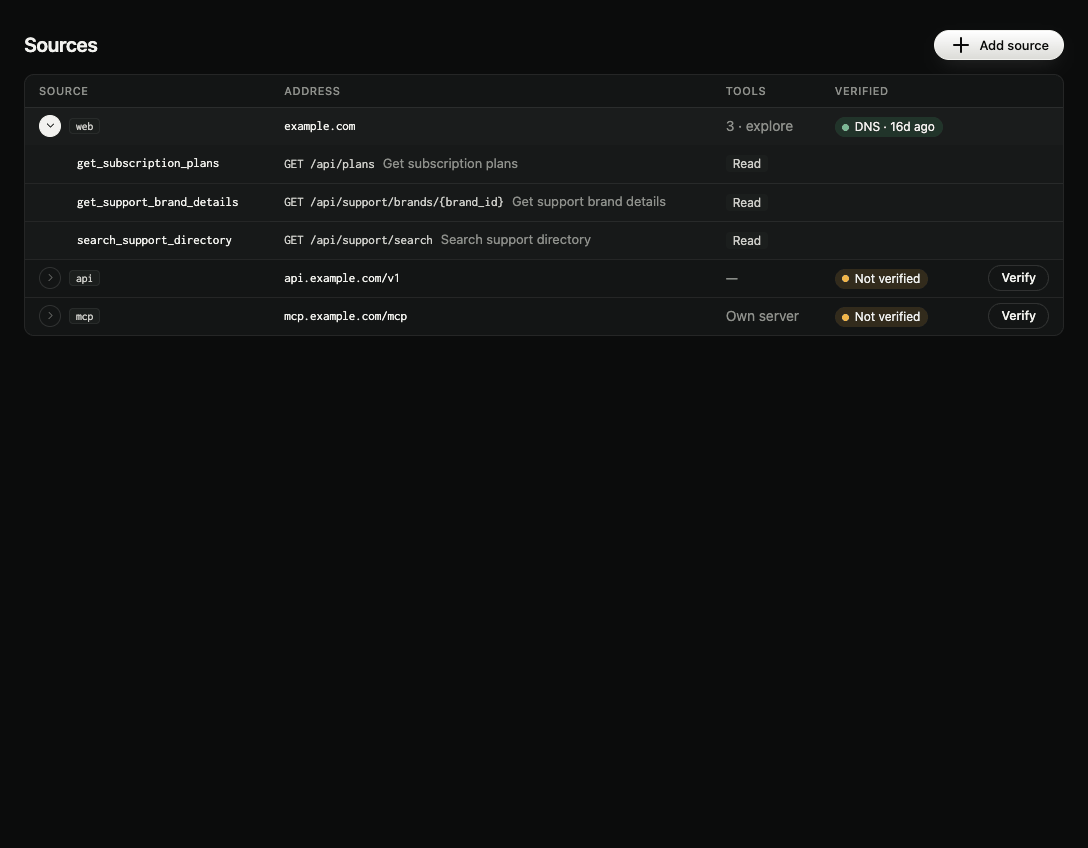
Kinds of source
| Source | Gives you | Proof needed for |
|---|---|---|
| Website | Tools from your site's pages and forms, found by explores and AI browser tests. Also the website side of every comparison. | Explores and AI browser tests |
| API | Tools drafted from its OpenAPI spec. | Hosting and AI connector tests |
| MCP server | The server you already run, used as the app's connector. It stays at its own address. | AI connector tests and listing help |
An app has at most one website and one MCP server, and any number of APIs. Tools from a website and its APIs can be merged into one connector.
The table
| Column | Meaning |
|---|---|
| Source | The kind. The arrow opens the source's tools (name, read or write, endpoint). |
| Address | The website, API base address or MCP server address. |
| Tools | How many tools its newest connector has, or the spec it keeps. |
| Verified | How it's proven, and when: DNS · 15d ago, File, Meta tag. Not verified until then. |
Verify on an unproven row checks for the proof file and, if it isn't there yet, shows Put this file at with the address and Copy file.
Add source (top right, members and admins) opens the Add source form. See Add a source.
Proof
Proof is asked for only when a step needs it, and only for the address that step touches. The domain record from Hosting's own-domain address covers every source on that domain and its subdomains, so a proven example.com also proves api.example.com. Otherwise:
| Source | Proof |
|---|---|
| Website | A meta tag on the home page, /.well-known/transica-verify.txt, or the DNS record |
| API | transica-verify.txt under the API's base path, or the DNS record |
| MCP server | transica-verify.txt under the server's path, or the DNS record |