Serve skills to AI apps
Give AI apps written steps for the tasks people do with your connector. Your hosted connector serves these skills with its tools, so people install nothing extra.
You need: a published connector that Transica hosts. Connectors made from your own MCP server have no skills. Who: members and admins; viewers can read skills.
Steps
- Open the connector from Connectors and select the Skills tab.
- Review the first drafts. Transica writes them once, after the first publish or when hosting is turned on, and marks them Transica draft. Select a skill to open it.
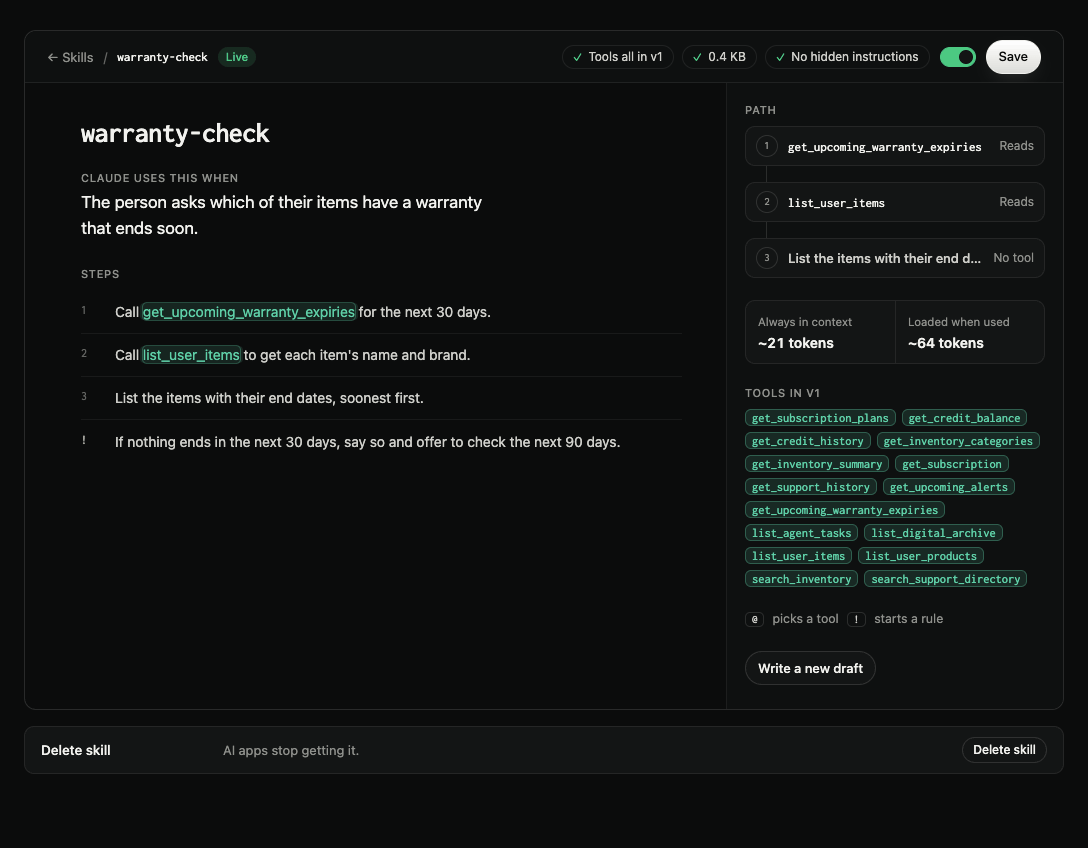
- Edit a skill, or select New skill to write one:
- Name: lowercase words joined by hyphens, such as
warranty-check. - Claude uses this when: one line that says what the person asks for.
- Steps: one action per step. Type @ to pick a tool. Type ! on an empty step to start a rule.
- To get steps written for you, fill in the name and when to use it, then select Write a new draft.
- Name: lowercase words joined by hyphens, such as
- Look at the checks at the top. Tools all in vN and No hidden instructions should both show.
- Select Save. AI apps get the change at once.
- To stop serving a skill, turn off the switch next to Save. To stop serving all of them, turn off Serve to AI apps on the Skills tab. To remove a skill, select Delete skill at the bottom of the editor.
Steps that AI apps follow well:
- Name a tool in each step, such as "Call
list_user_itemsto get each item's name." - Say what to do when a tool finds nothing.
- Before a tool that changes data, read the details back to the person and wait for a yes.
Which AI apps load your skills
| AI app | Loads skills from your connector? |
|---|---|
| Claude | Yes, in a public beta since 24 November 2026. On by default on Pro, Max and Ultra; on Team once an admin turns it on. |
| Claude Code | Yes, from version 2.1.331. Each skill appears as a command, /<server>:<skill>. Not in cloud sessions, claude -p, Remote Control server mode, GitHub Actions or the Agent SDK. |
| VS Code (GitHub Copilot) | Yes, from version 1.147. It asks to allow skills the first time it connects. |
| ChatGPT, Codex, Gemini CLI, Cursor | No. |
To check a skill, add your connector to Claude Code (Connect AI apps), start an interactive session and type /<server>:<skill>.
When you change a skill, AI apps may ask people to allow the new version.
When your tools change
A skill that names a tool the published version no longer has shows Names a removed tool. Open it and change the steps to use the tools that are left.
Read more: MCP skills: serve Agent Skills from your MCP server on transica.dev.